TL;DR: Understanding Meta Ads
Before you spend on Meta Ads, it’s important to get the mindset right. Unlike Google, Meta is not intent-based. You’re interrupting someone’s scroll, not answering a question. That means your ad needs to earn attention. Meta rewards ads that create a good user experience, not just the ones with high budgets. It works like an auction, where quality and relevance often beat money. The key is to test like a scientist, track what works, and treat every result as data. If you understand these four ideas, you’re already ahead of most beginners.
Understanding Meta Ads isn’t about knowing where to click. It’s about learning how to think. Most beginners jump into Ads Manager hoping the settings will do the work. But Meta doesn’t reward buttons. It rewards a mindset. Before you run your first campaign, you need to see Meta for what it is: a social platform protecting its users, not a vending machine for leads. This isn’t a how-to-click tutorial. It’s a how-to-think guide. In the next few minutes, you’ll learn four core mind-shifts that separate confident advertisers from those who waste their budgets and blame the algorithm.
Understanding Meta Ads as an Interruption: Why Attention Is Earned, Not Given
People on Google are searching for something. People on Meta are not.
That’s the first mindset shift you need to understand. On search platforms like Google, users already have intent. They’re actively looking for a product, a solution, or an answer. If you show up with a relevant offer, they’re likely to click.
But on Meta platforms like Facebook or Instagram, no one came looking for you. They’re scrolling to relax, laugh, watch reels, or catch up with friends. Your ad is an interruption. That’s not a bad thing. But it means you need to earn attention instead of assuming you’ll get it.
Think of it like this: Google is like a hardware store. People walk in already wanting to buy something. Meta is more like a dinner party. If you suddenly stand up at the table and start pitching your product, people will tune out unless you say something that’s actually interesting or helpful.
That’s why your Meta ad must feel like content, not a commercial. It must hook someone within seconds, either with curiosity, usefulness, or entertainment. The goal isn’t just to get seen. It’s to get noticed and remembered.
Try this: Instead of starting your ad by talking about your brand or features, open with a problem your audience faces, a bold question, or a surprising statement. Give them a reason to stop scrolling.
If your ad feels like an extension of what they were already enjoying, they’re far more likely to engage. That’s how you go from being an interruption to being welcome.
How Does the Three-Way Value Exchange Control Your Costs?
When you advertise on Meta, you’re not the only one with a goal. There are three players in the mix: you, Meta, and the user. And all three must benefit.
Let’s break it down.
-
The user opens Instagram or Facebook for entertainment or connection.
-
Meta wants to keep that user engaged on the platform.
-
You want to reach that user and drive a result, like a sale or lead.
Here’s the deal. If your ad makes the user stop, smile, watch, or click, Meta sees it as a good experience. That helps Meta retain the user. In return, they reward you by showing your ad more often and lowering your cost.
But if people skip or hide your ad, Meta sees it as bad content. Your reach drops. Your costs go up. Even if you’re spending a lot, poor creatives gets penalized.
That’s why it’s not just about budget or targeting. What matters most is how your ad makes people feel when they see it.
Here’s the mindset shift: You’re not buying attention. You’re earning it by respecting the user’s feed.
Tip: Test 2 or 3 different creatives at once. Compare performance. Focus on the version that gets likes, comments, saves, or clicks. Those signals tell Meta that people care. That’s how you reduce your cost and improve results.
Why Meta Ads Work Like an Auction, Not a Vending Machine
Many beginners treat Meta Ads like a vending machine. They assume that if they put in more money, they’ll automatically get better results. But Meta doesn’t work that way. Meta Ads run on a live auction system. To win, you need more than just money.
Each time an ad is about to appear, Meta holds a quick auction. You’re competing with other advertisers for the same viewer. But your bid is not only about how much you’re willing to pay. It’s made of three parts:
-
Your monetary bid
-
Your ad’s quality
-
Your ad’s relevance to the viewer
Meta calculates a total value for each ad based on these three inputs. The ad with the highest value wins the slot. This means that a smaller budget can still win if the ad is better targeted and more engaging.
If people stop scrolling to watch, read, or interact with your ad, Meta sees it as high-quality. Since Meta wants people to enjoy the platform, it rewards good ads by showing them more often and at a lower cost.
This is why relevance and quality matter more than just increasing your budget.
Pro tip: Don’t just spend more. Make better ads. Use Meta’s Ad Quality Guidelines to check your creative before you launch.
How to Think Like a Scientist When Running Meta Ads
Understanding Meta Ads means looking beyond wins or losses. It’s about treating every campaign like an experiment. One of the biggest mindset shifts in understanding Meta Ads is removing emotion from performance. A campaign that “fails” isn’t a failure. It’s a data point.
Think of yourself as a scientist in a lab. Each campaign is an experiment. You start with a hypothesis. For example, “This message will work best with this audience.” Then you test one variable at a time. That could be the headline, visual, audience, or offer. When results come in, don’t panic and don’t celebrate too soon. Just review what the data tells you. What worked? What didn’t?
This way, you stay calm and strategic. Over time, your process becomes less about guessing and more about refining what works.
Pro tip: Create a “learnings” file for every campaign. Add quick notes after each test. You’ll build your own playbook faster than most.
Want a deeper comparison between what works on Meta versus Google? This article breaks down what most marketers ignore: The Truth About Google Ads vs Facebook Ads: What No One Tells You
Conclusion: Mindset Before Mechanics
Understanding Meta Ads starts in your head, not in Ads Manager. Before you launch your first campaign, here’s a quick recap of the four mindset shifts you need:
-
Be a welcome interruption – Lead with value or curiosity to earn attention in a social feed.
-
Respect the value exchange – Create ads that users enjoy, so Meta rewards you with lower costs.
-
Think in auctions, not vending machines – Winning isn’t about budget alone. Relevance and quality play a big part.
-
Act like a scientist – Run tests, track what you learn, and keep emotion out of the process.
Most beginners jump straight into settings, hoping to “get it right.” But what separates skilled advertisers from frustrated ones is this mindset. The real work happens before the ad is live.
What’s the next step after mindset?
Build your ad strategy. Start with the funnel blueprint in Part 2 to plan your campaign the right way.
FAQ: Understanding Meta Ads
1. How long before I see results from Meta ads?
Most advertisers start seeing initial data trends within 7 to 14 days. However, consistent results take time. Meta’s algorithm needs enough data to optimize delivery. If you rush or keep changing your ads, the learning phase resets. Patience and consistency are key to understanding Meta Ads’ performance over time.
2. Can small budgets win Meta ad auctions?
Absolutely. Meta’s ad auction isn’t just about who pays the most. It also weighs ad quality and relevance. A compelling, well-targeted ad with a small budget can beat a poorly crafted one with a large budget. Focus on resonance, not just reach.
3. Why do some ads cost more than others?
Your ad costs depend on how Meta scores your ad’s relevance and engagement. If users ignore or hide your ad, costs go up. If they watch, click, or comment, Meta rewards you with lower CPMs. The better your ad experience, the less you pay.
4. What makes Meta ads different from Google ads?
Meta ads are about interruption, not intent. Users don’t come to scroll looking for your offer. You must grab their attention with storytelling or value. If you want a full comparison, read this detailed guide.
5. Why do good creatives matter so much?
Creatives are the first thing users notice. Strong visuals and copy build curiosity or connection fast. In Meta’s auction, engaging creatives improve your quality score, which directly reduces your cost per result.
6. What does Meta look for in a “good” ad?
Meta favors ads that people don’t skip, hide, or ignore. That means clean visuals, clear messaging, and content that feels native to the platform. When your ad blends into the feed experience while still offering value, Meta shows it more often.
7. How do I know if my ad is actually working?
Don’t just chase clicks. Look at key metrics like CTR, engagement rate, and conversion events. Always ask: what did I learn from this? Understanding Meta Ads means treating every result, good or bad, as valuable data.
The post Understanding Meta Ads: How It Boosts Your ROI appeared first on Best Media Agency.
]]>TL;DR
If you’re unsure whether to use Google Ads or Meta Ads, here’s what matters. Google Ads works best when people are actively searching for something specific. Meta Ads is better for building awareness and reaching people who may not be looking yet. Start with a small budget and test both platforms. Track key metrics like cost per lead and return on ad spend. Don’t rely only on automation. Check performance often and adjust. If your budget is limited and you have time, managing ads yourself is fine. But if you need faster results or expert guidance, consider hiring help. Before you spend anything, make sure your landing page loads quickly, works on mobile, and matches your ad.
Introduction
Choosing between Google Ads vs Meta Ads can make or break your ad budget in 2025. Pick the wrong one and you might waste time and money. Pick the right one and you could see real results fast.
This guide is for small business owners, startup founders, and marketing leads who want clear answers. No jargon. No hype. Just honest advice based on what works now.
You’ll learn how to pick the right platform, set a budget that makes sense, and avoid common risks with automation. I’ll also cover when to hire help, how AI tools can support your strategy, and why your landing page has to do the heavy lifting.
Every business is different. This isn’t about copying someone else’s playbook. It’s about helping you figure out what works for your goals, your team, and your budget.
If you’re planning to run paid ads, or already spending without seeing results, this is where you start.
Platform Selection – Google Ads or Meta Ads
Picking the right platform depends on how your customers behave and what your business needs right now. Google Ads and Meta Ads serve very different purposes, and knowing when to use which can save you from wasting your budget.
Intent vs. Discovery
Google Ads is built for search intent. That means people are already looking for what you offer. If someone searches “best small business accountant in Austin,” they’re ready to take action. That’s when Google works best.
Meta Ads is designed for discovery. You show your product to people who aren’t actively searching but might still be interested. It’s great for building awareness, especially for newer brands or products that benefit from visuals and storytelling.
Ad Formats and Costs
Google Ads mostly uses Search and Shopping ads. You target keywords and show up when people search. It’s more expensive per click, but the intent is high. In 2025, average CPC ranges from $2.50 to $5.00, depending on your industry and location.
Meta Ads run across Facebook, Instagram, and their extended network. Formats include Feed, Stories, Reels, and Messenger. The average CPC ranges from $1.50 to $3.00, but conversion rates can vary based on targeting and creative.
See full CPC benchmarks by industry on WordStream
When to Use Which
Here’s a quick way to decide:
| Use Google Ads if… | Use Meta Ads if… |
| You want direct leads or sales | You want to build brand awareness |
| Your product or service solves urgent problems | Your offer needs visual storytelling |
| People are searching for what you sell | You want to reach people before they start looking |
| You have strong landing pages | You have eye-catching creative |
| You need measurable ROI fast | You have eye-catching, creative |
Many businesses use both together. For example, I often run Meta campaigns to generate interest and then retarget warm users using Google Search when they’re ready to act. That combo works well for e-commerce, B2C services, and local businesses.
Related: The Truth About Google Ads vs Facebook Ads: What No One Tells You
Smart Budgeting for SMBs
If you’re running a small business or early-stage startup, every dollar you spend matters. Advertising can bring new customers fast, but only if your budget is used wisely. I’ve worked with brands spending just $500 a month and others spending over $50,000. The results don’t depend on how much you spend. They depend on planning, testing, and adjusting as you go.
Setting Your Budget
Start by setting your ad budget as a percentage of your monthly revenue. Most small businesses allocate between 5 to 15 percent (startup and small business ad budget ranges). Go with 5 to 10 percent if you want steady growth or are just starting. Choose 12 to 15 percent if you need faster traction or are launching something new.
Don’t ignore daily minimums. If your daily Google Ads budget is below $15 or your Meta Ads budget is under $10, the platforms may not gather enough data to optimize. That means your ads could run without reaching the right people. Always make sure your daily spend matches your campaign’s goals.
The goal isn’t to spend more. It’s to make each dollar count.
Sample Budget Split
Here’s a simple allocation I use with most SMB clients:
-
40 percent to Google Search
High-intent campaigns targeting keywords like “tax consultant in Austin” -
30 percent to Meta Ads
For interest-based discovery and brand engagement like “new product drops” or behind-the-scenes stories -
15 percent for testing
Try newer formats like Instagram Reels or YouTube Shorts. Or explore niche platforms like Pinterest, Reddit, or LinkedIn. -
15 percent for retargeting
Reach back out to warm audiences who visited your site but didn’t convert
This mix helps you build reach, test ideas, and drive conversion without putting all your budget in one place.
Adjusting Your Spend
Ad budgets should never be set and forgotten. Check results weekly using tools for Google Ads competitor research. If your Google Ads campaign gives a 5x return and Meta Ads only 2x, move more budget to Google. If you see high reach but no clicks, update your creative. If clicks are high but conversions are low, check your landing page.
Also, think about seasonality. You might increase spend during holidays, product launches, or industry events. Lower it during slow months or when ad fatigue kicks in.
Automation Risks in 2025
Can you trust Performance Max campaigns in 2025? That’s a question I get from almost every business owner I work with. The short answer: Sometimes. Automation helps, but only if you know where to draw the line.
When Automation Helps
Ad platforms push automated tools like Performance Max (Google) or Advantage+ (Meta) to save time. In some cases, they work. If you’re managing many ad groups or running dynamic bidding campaigns, automation can adjust bids in real time, split audiences by behavior, and even run tests faster than you could manually.
It’s useful for routine decisions, like when to raise bids on high-performing keywords or which time of day to show ads. For example, I’ve seen a shopping brand use Google’s smart bidding to lower its cost per conversion by 20 percent in a month.
The Top Risks
Automation isn’t always smart. It doesn’t know your customer like you do. If you leave things fully automated, here’s what often goes wrong:
-
Budget goes to irrelevant keywords
-
Ads get shown to the wrong audience
-
You lose visibility into what’s working and what’s not
Google’s Performance Max is powerful, but it can spend your entire budget before you spot what’s going wrong. ClickGUARD’s research on wasted spend shows how easily this happens.
Mitigation Checklist
Don’t hand over full control. Here’s how I manage automation with clients:
-
Cap your budgets and bids
-
Review campaigns manually every week
-
Run a manual ad set alongside automated campaigns
-
Track which one brings better return
If you’re exploring automation, start with the best Google Ads automation tool for 2025. But never skip human oversight.
DIY Ads vs. Hiring a Pro
Running your own ads might seem like the cheaper option. But how much is your time worth? And how fast do you need results? I’ve seen many small business owners try to figure it out alone. Some do okay. Others burn money without realizing what’s going wrong.
If you’re not sure where to start, this guide will help you decide if you should manage your ads or bring in an expert.
DIY vs Agency: Pros and Cons
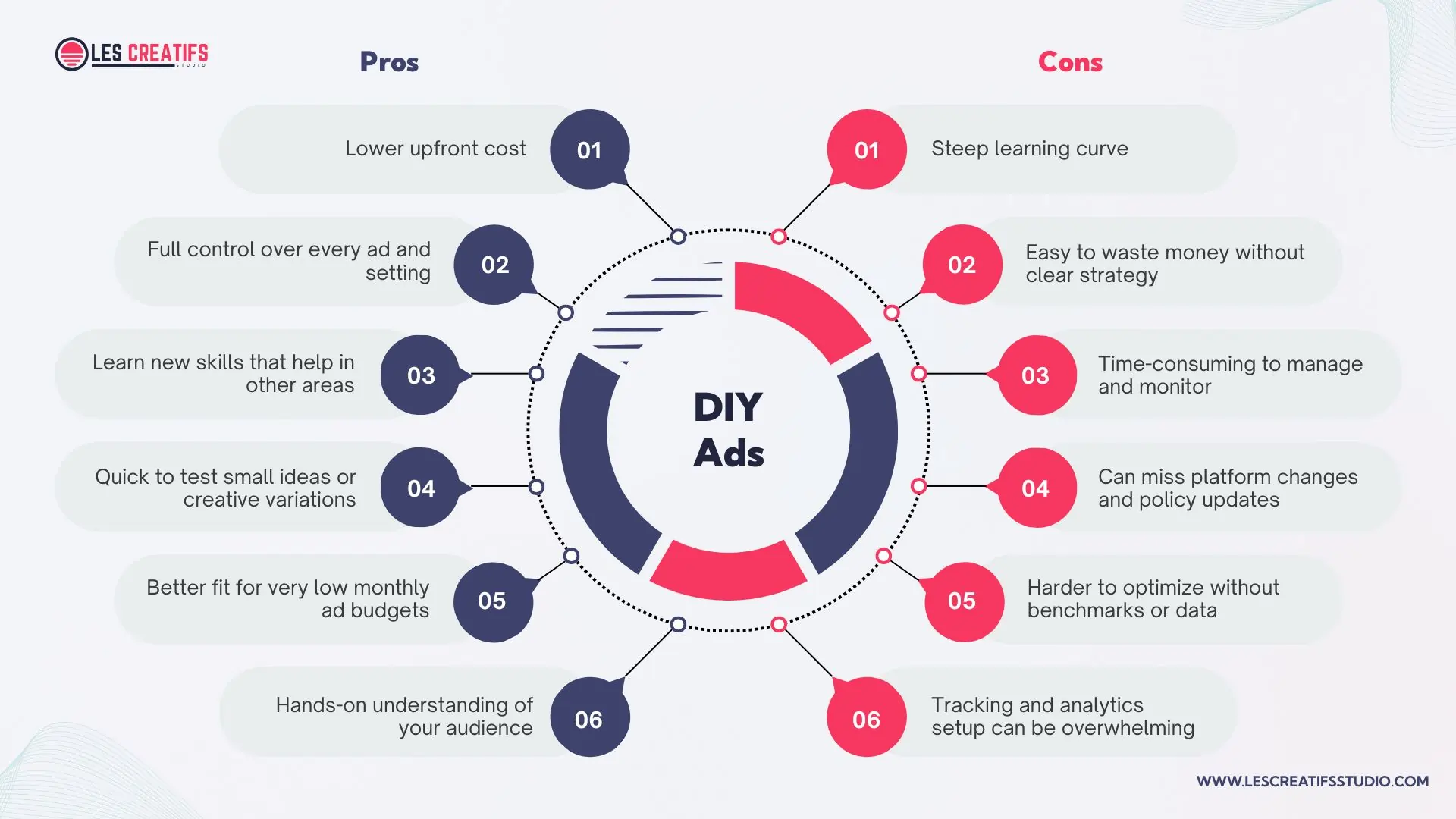
Pros and cons of managing Google or Meta ads yourself as a small business owner
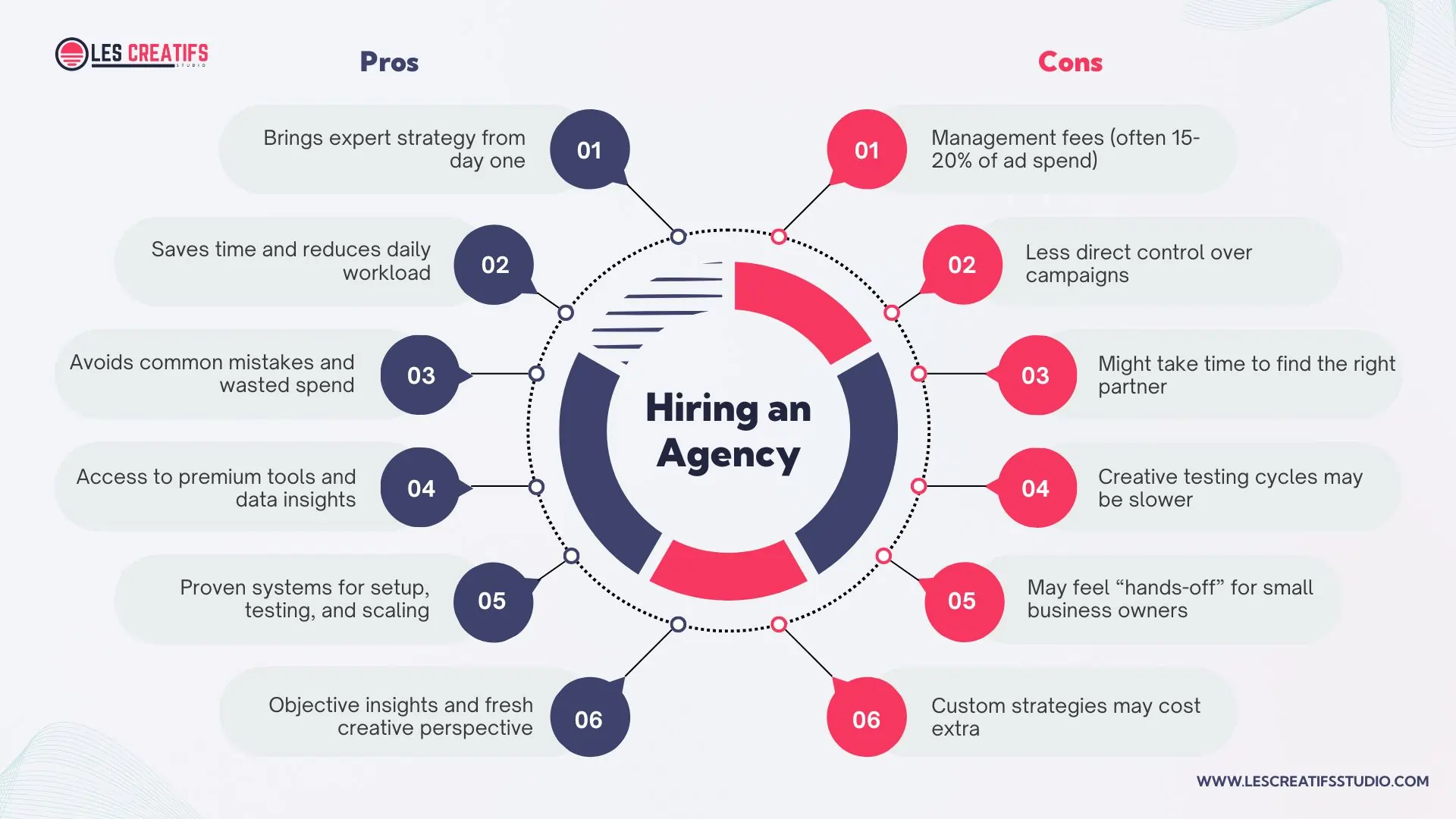
Pros and cons of hiring an ad agency to manage Google or Meta ad campaigns
DIY works well when your budget is under $2,000 per month, and you have time to learn. But managing Google Ads or Meta Ads is not as simple as clicking a boost button. You’ll need to understand targeting, bidding, creative testing, and how to track performance correctly.
Decision Checklist
Ask yourself these questions:
-
Do I have at least 5 to 10 hours a week to work on ads?
-
Am I comfortable testing, failing, and learning as I go?
-
Is my budget small enough that early mistakes won’t hurt?
-
Am I looking to scale fast or just test the waters?
If your time is limited or you’re unsure about where to start, hiring a pro might actually save you money in the long run.
When to Switch
Here’s a rule I often use: If your return on ad spend (ROAS) is under 2x after three months of DIY ads, consider bringing in expert help. Low ROAS usually means something’s off, your targeting, copy, or platform choice. A good ad specialist can fix these faster than trial and error.
Even if you start by doing it yourself, that doesn’t mean you have to stick with it forever. Many of my clients begin DIY, then bring us in to scale once they know their offer converts. That hybrid path works well for small teams.
Hybrid Funnel Strategy
A hybrid ad strategy blends Google Ads and Meta Ads to guide users through every stage of your marketing funnel. Instead of choosing one platform, you use both to support awareness, engagement, and conversion. This works well for small businesses that want the most out of their budget.
What is a hybrid ad strategy?
Meta Ads are great for the awareness stage. These show up in the feed or stories where people aren’t actively looking to buy but are open to discovering new brands. A strong reel, carousel, or short video can build interest without asking too much.
Once users interact with your ad or visit your site, you can retarget them using Meta again. This middle layer builds trust. You might show a testimonial, a product feature, or a time-sensitive offer to bring them closer to a decision.
Finally, Google Ads come in at the conversion stage. When users are searching for a solution, your search or shopping ad can show up at the right moment. This is where most purchases happen, especially for service-based businesses or e-commerce brands.
How to split a small budget
If your total budget is $1,000 per month, here’s a good starting point:
-
$400 for Meta awareness campaigns
-
$300 for Meta retargeting
-
$300 for Google Ads focused on conversions
Track performance using UTM tags and compare the return on each segment. As results come in, shift spend toward what’s working.
Keep your branding consistent
It’s important that your copy, images, and offers match across platforms. If Meta ads say “Free 14-Day Trial,” your Google ads and landing pages should say the same. This consistency builds trust and improves conversions.
For a deeper look at why brand consistency matters, read Why Brand Identity and Brand Guidelines Matter for Success. You’ll learn how visuals, tone, and messaging support ad performance.
You can also check this guide from Search Engine Journal to see how global brands build full-funnel strategies using blended platforms.
Landing Pages – The Missing Link
Running great ads means nothing if the landing page doesn’t convert. It’s often the part business owners forget to fix. You could be wasting clicks simply because the page isn’t doing its job.
What makes a landing page work?
A strong page loads fast, works well on mobile, and gives one clear action. Aim for a load time under 2 seconds. Make sure it looks good on phones. And don’t try to say everything. Just guide the user toward one thing: buy, book, or sign up.
Where most pages go wrong
Many small business pages have too much text, confusing layouts, or messages that don’t match the ad. If someone clicks an ad for a free trial but lands on a page about features, they’ll leave. Pages also fail when the forms are too long or the buttons are hard to find.
How to fix it
Use tools like Hotjar to track where people drop off. Cut your form fields to just what you need. Try different call-to-action buttons like “Start Free Trial” or “See Plans.” Small changes like this can double your conversions.
Your ad is only as good as where it leads.
Check your speed with Google PageSpeed Insights. And if you’re still building your site, read The Best Website Builder for Small Business. A faster, cleaner page could make all the difference.
Conclusion and Key Takeaways
If you’re deciding between Google Ads or Meta Ads, it doesn’t have to be a guess. The best strategy starts with knowing your audience and matching that to the right platform. Google helps you reach people ready to buy. Meta helps you build trust and stay visible.
Here’s what matters most:
-
Google = search intent
-
Meta = brand awareness
-
Test both and adjust your budget monthly
-
Use automation, but review performance manually
-
DIY works for tight budgets, but hire help if growth stalls
-
Fix your landing page before spending more
Start simple. Run a 30-day ad experiment across both platforms. Track your CTR, CPA, and ROAS every week. Use what you learn to adjust, improve, and grow.
Looking for more tips? Visit our Insights Page for hands-on guidance.
FAQ
Which is cheaper: Google Ads or Meta Ads?
Meta Ads usually cost less per click. But Google Ads may convert better for high-intent users. The right platform depends on your goals and audience.
How much should a small business spend on online ads?
Most small businesses spend 5 to 15 percent of their revenue. You can start with as little as $500 per month. Track results and adjust as you learn.
Can you trust Google Performance Max or Meta Advantage+?
These tools help automate your campaigns, but they’re not perfect. You still need to monitor results and set limits. Use them to save time, not to replace strategy.
Is it better to hire an agency or run ads myself?
If your budget is below $1,000, DIY might be best. If you’re spending more or scaling fast, an expert can save time and boost returns.
How do I know if my landing page is ready for paid traffic?
Your page should load in under 2 seconds, be easy to use on mobile, and match your ad message. Use tools like Hotjar or Google PageSpeed to check.
Is Facebook Ads cheaper than Google Ads?
Yes, Meta Ads (Facebook and Instagram) often have a lower cost-per-click than Google Ads. But cheaper clicks don’t always mean better results. Meta is better for awareness and engagement. Google tends to drive more direct actions like purchases or sign-ups.
How much should a small business spend on ads?
Start with 5 to 15 percent of your monthly revenue. That usually means $500 to $3,000 per month. Begin with high-intent search ads, then expand to social and retargeting once you see results.
The post What to Know Before Spending on Google Ads or Meta Ads appeared first on Best Media Agency.
]]>