These zero‑cost techniques let you directly see competitors Google Ads in search results and related insights without any paid tools. While they require manual effort, they reveal exactly what real users see—and help you spot keyword and creative opportunities instantly.
TL;DR
Meta Ad Metrics fall into two groups. Leading indicators like CTR, CPC, and CPM explain why your ads perform a certain way, while lagging indicators like CPA and ROAS show what results you got. Always check CPA or ROAS first, then use the other numbers to diagnose problems. A high CTR but poor ROAS means the ad works but the offer fails. Low CTR means the creative is weak. High CPM points to expensive audiences. Good ROAS but low volume means you need more scale. The story is simple: focus on sustainable CPA or ROAS, and let the other metrics guide your fixes.
Open Ads Manager, and you’re hit with numbers everywhere. CTR, CPC, CPM, ROAS, CPA, the list keeps growing. For many advertisers, it feels less like data and more like noise. You scroll through the dashboard and wonder which number is worth your attention.
Meta Ad Metrics are the numbers inside Ads Manager that explain both why your ads behave the way they do and what results they bring. The problem is, most advertisers try to track all of them and end up confused.
The truth is, not every metric matters. What you need is a simple way to read the story behind the numbers. Some metrics explain why performance looks a certain way. Others show what the business actually achieved.
In our earlier piece, Understanding Meta Ads, we covered the mindset you need before running ads. This article builds on that foundation by showing you how to separate signal from noise and focus on the numbers that tell the real story.
What Are Leading vs Lagging Indicators?
One of the fastest ways to make sense of Meta Ad Metrics is to split them into two groups: leading indicators and lagging indicators. This simple shift can stop you from drowning in numbers and help you focus on what matters most.
Leading indicators are the early signals that tell you how healthy your ads are. These include:
-
CTR (Click-Through Rate): Shows how many people click after seeing your ad.
-
CPC (Cost Per Click): Tells you how much you pay for each click.
-
CPM (Cost Per Mille): The cost to reach one thousand people in your chosen audience.
These Meta Ads Manager metrics don’t prove business success, but they explain why your ads are performing the way they are. If clicks are low or costs are high, the issue is often with your creative, audience, or message.
Lagging indicators are the result metrics that show the outcome of your campaigns. The key ones are:
-
CPA (Cost Per Acquisition): How much it costs to win a customer.
-
ROAS (Return on Ad Spend): The revenue generated for every dollar spent.
These are the numbers you care about most, because they prove whether your ads are delivering sustainable growth.
Many advertisers confuse the two. They panic when CTR dips, even though ROAS is strong. Or they celebrate a high CTR while ignoring that ROAS is weak. Both mistakes lead to poor decisions. The right way is to check lagging indicators first, then use leading indicators to diagnose the reasons behind them.
Your funnel stage also plays a role. In How to Build a Meta Ads Funnel That Converts, we showed how awareness ads behave differently from conversion ads. The metrics you watch will shift with each stage of that funnel.
For more details on how Meta reports these numbers, see Meta’s official guide on Ads Reporting. The key is simple: leading tells you why, lagging tells you what. Always read Meta Ad Metrics in context, not in isolation.
How Do You Read the Story in Meta Ad Metrics?
Every number in Ads Manager plays a role in a bigger story. Some metrics act like early hints, while others are the final chapter. When you connect them, you can spot where things go wrong and where they are working.
Think of it like this: lagging indicators (CPA, ROAS) tell you the ending of the story. Leading indicators (CTR, CPC, CPM) explain how you got there. If the ending looks bad, the early clues help you figure out why.
Here are four common scenarios and the stories they tell:
-
Scenario A: High CTR, bad ROAS
Story: The ad grabs attention, but people don’t buy once they click. This means the creative is strong, but the landing page, pricing, or offer is failing to convert.
Fix: Review the page experience and tighten the offer before spending more. -
Scenario B: Low CTR
Story: Very few people click, which means the creative and copy are not resonating with the audience. The hook is weak.
Fix: Test new angles, stronger headlines, or fresh visuals. Even small changes can lift CTR. -
Scenario C: High CPM
Story: You are paying a high price just to reach people. That usually means the audience is expensive or highly competitive.
Fix: Expand the audience, refine targeting, or test different placements. Platform choice also matters — CPM and CPC can vary between networks, as explained in The Truth About Google Ads vs Facebook Ads. -
Scenario D: Great ROAS, but low volume
Story: The ads are profitable, but you are not getting enough scale. This happens when targeting is too narrow or budgets are capped.
Fix: Broaden the audience, raise spend gradually, or add new creative variations to reach more people.
These stories repeat across campaigns. Each one shows how leading indicators point to the cause behind lagging results. The mistake is to treat Meta Ad Metrics in isolation. When you read them together, you see the full picture.
The real skill is diagnosis. You don’t stop at “CTR is low” or “ROAS is bad.” You ask what the story is behind those numbers. That shift changes the way you troubleshoot. Instead of guessing, you follow the clues. And once you see the story, you know exactly where to act.
The Metric That Truly Matters in Meta Ad Metrics
When you look at Meta Ad Metrics, it’s easy to get distracted by every number on the screen. CTR, CPC, and CPM matter, but they don’t decide if your ads are truly working. The ultimate test of success comes down to two numbers: CPA (Cost Per Acquisition) and ROAS (Return on Ad Spend).
These are the business metrics. CPA tells you how much it costs to win a customer. ROAS tells you how much revenue you generate for every dollar you spend. Together, they answer the only question that matters: is this campaign profitable and sustainable for the business?
The other Meta Ads Manager metrics are still important, but only as supporting signals. A low CTR can warn you that creative is weak. A high CPM can show that your audience is competitive. These clues help you diagnose why your CPA or ROAS looks good or bad. But on their own, they don’t mean much.
This is where many advertisers get lost. They celebrate a high CTR without realizing their ROAS is negative. Or they panic about a high CPM even though their CPA is efficient. The story can only be read correctly when you place the supporting metrics in context with CPA and ROAS.
Benchmarks can also help you understand if your numbers are in line with industry averages. According to WordStream’s PPC Benchmarks, average CTR, CPC, and conversion rates vary widely by sector. Knowing these ranges can stop you from chasing unrealistic goals or worrying about numbers that are normal for your industry.
The rule is simple: check CPA and ROAS first. If they look healthy, your ads are on track. If not, use the other metrics to diagnose why. Everything else is just a supporting actor in the bigger story.
Key Takeaways
Meta Ad Metrics only make sense when you know what role each number plays. Leading indicators such as CTR, CPC, and CPM explain why your ads perform the way they do. Lagging indicators like CPA and ROAS show what business results you actually achieved.
The scenarios we covered prove that every number tells part of the story. A high CTR but poor ROAS points to problems with your offer or landing page. Low CTR highlights weak creative. High CPM signals expensive audiences. Strong ROAS but low volume shows you need more scale. Each case is a diagnosis, not just a random figure on a dashboard.
The lesson is simple: success is measured by sustainable CPA or ROAS. The other Meta Ad Metrics are valuable only because they explain why those final numbers look the way they do. Read them as a story, not in isolation.
FAQ
What’s the difference between CPC and CPM?
CPC (Cost Per Click) is what you pay each time someone clicks on your ad. CPM (Cost Per Mille) is the cost to show your ad to one thousand people, whether they click or not. CPC measures engagement, while CPM measures the cost of reach.
Which metric matters in the first week of a campaign?
In the early days, focus on leading indicators such as CTR, CPC, and CPM. These Meta Ads Manager metrics show if your creative and targeting are working before you have enough purchase data to judge CPA or ROAS. Once results build up, shift your focus to lagging indicators.
Can a high CTR still mean a losing campaign?
Yes. A strong CTR only proves your ad grabs attention. If ROAS is weak, the landing page or offer is not converting those clicks into customers. High engagement without sales means the campaign is failing, even though CTR looks good.
How do I know if my CPM is too high?
Compare your CPM against industry averages. Some audiences, like finance or software, will naturally cost more. If CPM is high across all audiences, your targeting may be too narrow or too competitive.
What’s more important: CPA or ROAS?
Both matter, but CPA tells you if you can afford to keep acquiring customers, while ROAS shows if the campaign generates enough revenue. Together, they reveal if your ads are truly sustainable.
The post How to Read Meta Ad Metrics Without Getting Lost appeared first on Best Media Agency.
]]>TL;DR
To run effective Meta Ads, you need a clear funnel strategy. This means understanding how to speak to cold, warm, and hot audiences differently. Start with awareness campaigns to reach new people (TOFU), move to trust-building content for those who’ve shown interest (MOFU), and then focus on converting high-intent users (BOFU). Match your campaign objectives to each stage and run both prospecting and retargeting ads. In this article, I’ll walk you through a beginner-friendly blueprint to structure your first Meta Ads funnel that actually works.
If you’re running ads without a plan, you’re wasting money. A good meta ads funnel gives every campaign a purpose. It helps you speak to people based on how well they know your brand. Cold audiences need awareness. Warm audiences need trust. Hot audiences need a clear offer. In this article, I’ll walk you through how to set up your funnel using Meta Ads. I’ll also show you the difference between prospecting and retargeting so you can build a strategy that works from day one.
What Are the Three Stages of the Meta Ads Funnel?
Most people run Meta Ads and hope for quick results. However, the truth is that most people don’t buy the first time they encounter your brand. That’s why a clear meta ads funnel matters. It helps you tailor your message to people based on their level of familiarity with your brand.
There are three main stages. I use this structure for every campaign I build.
1. TOFU – Top of Funnel (Cold Audiences)
This is where the journey starts. These people don’t know who you are. They haven’t visited your site or interacted with your brand before. Your goal here is to introduce yourself, not to sell.
You want to give value and start a conversation. This is where you build awareness.
What works well at TOFU:
-
Short videos that show what you do
-
Quick tips or educational content
-
Thoughtful posts that spark curiosity
-
Stories that make your brand relatable
Avoid asking for anything at this stage. Just give people a reason to notice you.
2. MOFU – Middle of Funnel (Warm Audiences)
This group knows you. They may have liked your content, followed your page, or clicked an ad. They’re interested, but not ready to buy.
At this stage, your job is to build trust. Help them understand your offer and why it matters. Remove doubts. Give proof.
What works at MOFU:
-
Testimonials or case studies
-
How-to content or product explainers
-
Comparisons and before-and-after stories
-
Free downloads or lead magnets
The goal is to move them closer to a decision without pressure.
3. BOFU – Bottom of Funnel (Hot Audiences)
These people are ready. They’ve visited your pricing page, added something to their cart, or engaged multiple times.
Now it’s about conversion. You don’t need to reintroduce your brand. You need to give them a reason to act now.
What works at BOFU:
-
Limited-time offers
-
Free trials or consultations
-
Clear benefits and strong CTAs
-
Content focused on making the final decision easy
This is where sales happen, but only if you’ve done the earlier work.
A strong meta ads funnel moves people from cold to warm to hot. Each stage plays a different role. Skipping one will cost you money. When you build the full journey, your ads work better and convert more.
If you’re not yet familiar with how Meta Ads actually work behind the scenes, start with this breakdown of what really drives results. It’ll give you the right mindset before you build your strategy.
The classic TOFU–MOFU–BOFU framework has been used in marketing for years, and this piece by HubSpot does a great job explaining why it works across industries.
How Do Campaign Objectives Match Each Funnel Stage?
When you run Meta Ads, the platform asks you to choose a campaign objective. This isn’t just a technical setting. Your objective tells Meta what result you want. It also guides the algorithm on how to deliver your ads.
Each stage of your meta ads funnel has a different goal. You need to match that goal with the right objective. Here’s how I approach it.
Funnel Stage vs. Campaign Objective
| Funnel Stage | Audience Type | Campaign Goal | Best Meta Objectives | Example Use Case |
| TOFU | Cold audiences | Build awareness | Awareness, Video Views, Traffic | Promote a short brand video or blog article |
| MOFU | Warm audiences | Build trust, educate | Engagement, Leads, Conversions | Offer a free guide or retarget video viewers |
| BOFU | Hot audiences | Drive conversions | Sales, Website Purchases, Catalog Sales | Show a limited-time offer to cart abandoners |
Here’s how I use this in practice:
-
At TOFU, I run traffic or video view campaigns to reach new people. I keep the content focused on value and visibility.
-
For MOFU, I move to lead generation or engagement. A lead magnet or testimonial works well at this stage.
-
At BOFU, I go straight to conversions. This is where I add urgency and use direct calls to action.
A lot of new advertisers choose the wrong objective and end up wasting their budget. If you ask for sales at the top of the funnel, the cost will be high and the results will be weak. If you only boost posts at the bottom, you’ll miss conversions.
Meta explains each campaign objective clearly in this official guide, which I recommend bookmarking.
What’s the Difference Between Prospecting and Retargeting?
Every Meta Ads account should run two types of campaigns: prospecting and retargeting. Both serve different goals, and both are essential if you want consistent results.
Prospecting means reaching new people. These are cold audiences who’ve never seen your brand. It’s what you use at the top of the funnel (TOFU). Your goal is to build awareness and introduce your brand. These campaigns help you grow your audience pool.
Retargeting means speaking to people who already know you. Maybe they watched your video, visited your website, or clicked an ad. These are warm or hot audiences. You use retargeting in the middle and bottom of the funnel (MOFU and BOFU) to build trust and drive conversions.
If you only run prospecting ads, you’ll get reach but no follow-up. If you only retarget, your audience will shrink fast, and your costs will climb. A strong meta ads funnel strategy does both.
The same logic applies across platforms. If you’re unsure when to use Meta versus Google for this, I broke it down in this article on Google Ads vs Meta Ads.
How to Launch Your First Funnel Strategy
If this is your first time building a meta ads funnel, keep it simple. You don’t need a complex setup. Start with two campaigns. One to attract new people. One to follow up with those who showed interest.
This is the same structure I use when helping businesses set up their first ad system.
Step 1: TOFU Prospecting Campaign
-
Goal: Awareness or traffic
-
Audience size: At least 500,000 cold users
-
Budget: 60 percent of your total monthly spend
-
Creative tips:
-
Use short videos or carousels
-
Focus on brand value, not product features
-
Avoid direct offers or sales language
-
-
Key metric: CTR (Click-through rate)
This campaign introduces your brand to new people. You’re building visibility, not selling yet.
Step 2: MOFU + BOFU Retargeting Campaign
-
Goal: Leads or conversions
-
Audience size: Around 10,000 to 50,000 people who visited your site or engaged with your ads
-
Budget: 40 percent of your total spend
-
Creative tips:
-
MOFU: Use testimonials or explainer posts
-
BOFU: Use limited-time offers or free trials
-
-
Key metrics:
-
MOFU: CPL (Cost per lead)
-
BOFU: ROAS (Return on ad spend)
-
This is where conversions happen. These people already know you. Make the next step easy to take.
If you’re unsure about how to structure your budget or audience, you can contact us, and we’ll help you plan your first funnel effectively.
Conclusion: Build with Purpose, Then Measure
Now you have a clear structure to start your Meta Ads journey. You understand how to speak to cold, warm, and hot audiences. You know which campaign objectives to choose and how to balance prospecting with retargeting. You also have a simple, focused plan to launch your first funnel with confidence.
But once your ads are running, the next question is: how do you know what’s working?
That’s where we’re heading next. In the next article, “How to Read Meta Ad Metrics Without Getting Lost“, I’ll show you how to read your metrics, what to ignore, and how to make better decisions based on real data.
FAQ
1. What if my TOFU ads get clicks but no sales?
That’s expected. At the top of the funnel, people are just becoming familiar with your brand. They may click out of curiosity, not intent. Use this stage to build awareness, then move them into retargeting campaigns where you can build trust and eventually drive conversions.
2. Can I skip TOFU and only run conversion ads?
You can, but it usually leads to poor results. Cold audiences aren’t ready to buy. Without first seeing value or building some trust, even a great product will be ignored. Skipping TOFU means you’ll spend more and convert less.
3. How long should I wait before retargeting someone?
It depends on your funnel length and product type. For most offers, retargeting after 3 to 7 days of engagement works well. That gives people time to absorb your message but keeps your brand fresh in their minds.
4. What metrics should I track at each stage?
Start simple. Use CTR at TOFU to check engagement, CPL at MOFU to measure lead quality, and ROAS at BOFU to track return on spend. Don’t rely on one number alone. Each metric tells part of the full story.
5. What if my retargeting audience is too small?
That’s a sign you need to scale TOFU first. Retargeting only works when you have enough people in your funnel. Focus on expanding your reach with awareness or traffic campaigns, then revisit retargeting once your warm pool grows.
The post How to Build a Meta Ads Funnel That Converts appeared first on Best Media Agency.
]]>TL;DR: Understanding Meta Ads
Before you spend on Meta Ads, it’s important to get the mindset right. Unlike Google, Meta is not intent-based. You’re interrupting someone’s scroll, not answering a question. That means your ad needs to earn attention. Meta rewards ads that create a good user experience, not just the ones with high budgets. It works like an auction, where quality and relevance often beat money. The key is to test like a scientist, track what works, and treat every result as data. If you understand these four ideas, you’re already ahead of most beginners.
Understanding Meta Ads isn’t about knowing where to click. It’s about learning how to think. Most beginners jump into Ads Manager hoping the settings will do the work. But Meta doesn’t reward buttons. It rewards a mindset. Before you run your first campaign, you need to see Meta for what it is: a social platform protecting its users, not a vending machine for leads. This isn’t a how-to-click tutorial. It’s a how-to-think guide. In the next few minutes, you’ll learn four core mind-shifts that separate confident advertisers from those who waste their budgets and blame the algorithm.
Understanding Meta Ads as an Interruption: Why Attention Is Earned, Not Given
People on Google are searching for something. People on Meta are not.
That’s the first mindset shift you need to understand. On search platforms like Google, users already have intent. They’re actively looking for a product, a solution, or an answer. If you show up with a relevant offer, they’re likely to click.
But on Meta platforms like Facebook or Instagram, no one came looking for you. They’re scrolling to relax, laugh, watch reels, or catch up with friends. Your ad is an interruption. That’s not a bad thing. But it means you need to earn attention instead of assuming you’ll get it.
Think of it like this: Google is like a hardware store. People walk in already wanting to buy something. Meta is more like a dinner party. If you suddenly stand up at the table and start pitching your product, people will tune out unless you say something that’s actually interesting or helpful.
That’s why your Meta ad must feel like content, not a commercial. It must hook someone within seconds, either with curiosity, usefulness, or entertainment. The goal isn’t just to get seen. It’s to get noticed and remembered.
Try this: Instead of starting your ad by talking about your brand or features, open with a problem your audience faces, a bold question, or a surprising statement. Give them a reason to stop scrolling.
If your ad feels like an extension of what they were already enjoying, they’re far more likely to engage. That’s how you go from being an interruption to being welcome.
How Does the Three-Way Value Exchange Control Your Costs?
When you advertise on Meta, you’re not the only one with a goal. There are three players in the mix: you, Meta, and the user. And all three must benefit.
Let’s break it down.
-
The user opens Instagram or Facebook for entertainment or connection.
-
Meta wants to keep that user engaged on the platform.
-
You want to reach that user and drive a result, like a sale or lead.
Here’s the deal. If your ad makes the user stop, smile, watch, or click, Meta sees it as a good experience. That helps Meta retain the user. In return, they reward you by showing your ad more often and lowering your cost.
But if people skip or hide your ad, Meta sees it as bad content. Your reach drops. Your costs go up. Even if you’re spending a lot, poor creatives gets penalized.
That’s why it’s not just about budget or targeting. What matters most is how your ad makes people feel when they see it.
Here’s the mindset shift: You’re not buying attention. You’re earning it by respecting the user’s feed.
Tip: Test 2 or 3 different creatives at once. Compare performance. Focus on the version that gets likes, comments, saves, or clicks. Those signals tell Meta that people care. That’s how you reduce your cost and improve results.
Why Meta Ads Work Like an Auction, Not a Vending Machine
Many beginners treat Meta Ads like a vending machine. They assume that if they put in more money, they’ll automatically get better results. But Meta doesn’t work that way. Meta Ads run on a live auction system. To win, you need more than just money.
Each time an ad is about to appear, Meta holds a quick auction. You’re competing with other advertisers for the same viewer. But your bid is not only about how much you’re willing to pay. It’s made of three parts:
-
Your monetary bid
-
Your ad’s quality
-
Your ad’s relevance to the viewer
Meta calculates a total value for each ad based on these three inputs. The ad with the highest value wins the slot. This means that a smaller budget can still win if the ad is better targeted and more engaging.
If people stop scrolling to watch, read, or interact with your ad, Meta sees it as high-quality. Since Meta wants people to enjoy the platform, it rewards good ads by showing them more often and at a lower cost.
This is why relevance and quality matter more than just increasing your budget.
Pro tip: Don’t just spend more. Make better ads. Use Meta’s Ad Quality Guidelines to check your creative before you launch.
How to Think Like a Scientist When Running Meta Ads
Understanding Meta Ads means looking beyond wins or losses. It’s about treating every campaign like an experiment. One of the biggest mindset shifts in understanding Meta Ads is removing emotion from performance. A campaign that “fails” isn’t a failure. It’s a data point.
Think of yourself as a scientist in a lab. Each campaign is an experiment. You start with a hypothesis. For example, “This message will work best with this audience.” Then you test one variable at a time. That could be the headline, visual, audience, or offer. When results come in, don’t panic and don’t celebrate too soon. Just review what the data tells you. What worked? What didn’t?
This way, you stay calm and strategic. Over time, your process becomes less about guessing and more about refining what works.
Pro tip: Create a “learnings” file for every campaign. Add quick notes after each test. You’ll build your own playbook faster than most.
Want a deeper comparison between what works on Meta versus Google? This article breaks down what most marketers ignore: The Truth About Google Ads vs Facebook Ads: What No One Tells You
Conclusion: Mindset Before Mechanics
Understanding Meta Ads starts in your head, not in Ads Manager. Before you launch your first campaign, here’s a quick recap of the four mindset shifts you need:
-
Be a welcome interruption – Lead with value or curiosity to earn attention in a social feed.
-
Respect the value exchange – Create ads that users enjoy, so Meta rewards you with lower costs.
-
Think in auctions, not vending machines – Winning isn’t about budget alone. Relevance and quality play a big part.
-
Act like a scientist – Run tests, track what you learn, and keep emotion out of the process.
Most beginners jump straight into settings, hoping to “get it right.” But what separates skilled advertisers from frustrated ones is this mindset. The real work happens before the ad is live.
What’s the next step after mindset?
Build your ad strategy. Start with the funnel blueprint in Part 2 to plan your campaign the right way.
FAQ: Understanding Meta Ads
1. How long before I see results from Meta ads?
Most advertisers start seeing initial data trends within 7 to 14 days. However, consistent results take time. Meta’s algorithm needs enough data to optimize delivery. If you rush or keep changing your ads, the learning phase resets. Patience and consistency are key to understanding Meta Ads’ performance over time.
2. Can small budgets win Meta ad auctions?
Absolutely. Meta’s ad auction isn’t just about who pays the most. It also weighs ad quality and relevance. A compelling, well-targeted ad with a small budget can beat a poorly crafted one with a large budget. Focus on resonance, not just reach.
3. Why do some ads cost more than others?
Your ad costs depend on how Meta scores your ad’s relevance and engagement. If users ignore or hide your ad, costs go up. If they watch, click, or comment, Meta rewards you with lower CPMs. The better your ad experience, the less you pay.
4. What makes Meta ads different from Google ads?
Meta ads are about interruption, not intent. Users don’t come to scroll looking for your offer. You must grab their attention with storytelling or value. If you want a full comparison, read this detailed guide.
5. Why do good creatives matter so much?
Creatives are the first thing users notice. Strong visuals and copy build curiosity or connection fast. In Meta’s auction, engaging creatives improve your quality score, which directly reduces your cost per result.
6. What does Meta look for in a “good” ad?
Meta favors ads that people don’t skip, hide, or ignore. That means clean visuals, clear messaging, and content that feels native to the platform. When your ad blends into the feed experience while still offering value, Meta shows it more often.
7. How do I know if my ad is actually working?
Don’t just chase clicks. Look at key metrics like CTR, engagement rate, and conversion events. Always ask: what did I learn from this? Understanding Meta Ads means treating every result, good or bad, as valuable data.
The post Understanding Meta Ads: How It Boosts Your ROI appeared first on Best Media Agency.
]]>TL;DR
If you’re unsure whether to use Google Ads or Meta Ads, here’s what matters. Google Ads works best when people are actively searching for something specific. Meta Ads is better for building awareness and reaching people who may not be looking yet. Start with a small budget and test both platforms. Track key metrics like cost per lead and return on ad spend. Don’t rely only on automation. Check performance often and adjust. If your budget is limited and you have time, managing ads yourself is fine. But if you need faster results or expert guidance, consider hiring help. Before you spend anything, make sure your landing page loads quickly, works on mobile, and matches your ad.
Introduction
Choosing between Google Ads vs Meta Ads can make or break your ad budget in 2025. Pick the wrong one and you might waste time and money. Pick the right one and you could see real results fast.
This guide is for small business owners, startup founders, and marketing leads who want clear answers. No jargon. No hype. Just honest advice based on what works now.
You’ll learn how to pick the right platform, set a budget that makes sense, and avoid common risks with automation. I’ll also cover when to hire help, how AI tools can support your strategy, and why your landing page has to do the heavy lifting.
Every business is different. This isn’t about copying someone else’s playbook. It’s about helping you figure out what works for your goals, your team, and your budget.
If you’re planning to run paid ads, or already spending without seeing results, this is where you start.
Platform Selection – Google Ads or Meta Ads
Picking the right platform depends on how your customers behave and what your business needs right now. Google Ads and Meta Ads serve very different purposes, and knowing when to use which can save you from wasting your budget.
Intent vs. Discovery
Google Ads is built for search intent. That means people are already looking for what you offer. If someone searches “best small business accountant in Austin,” they’re ready to take action. That’s when Google works best.
Meta Ads is designed for discovery. You show your product to people who aren’t actively searching but might still be interested. It’s great for building awareness, especially for newer brands or products that benefit from visuals and storytelling.
Ad Formats and Costs
Google Ads mostly uses Search and Shopping ads. You target keywords and show up when people search. It’s more expensive per click, but the intent is high. In 2025, average CPC ranges from $2.50 to $5.00, depending on your industry and location.
Meta Ads run across Facebook, Instagram, and their extended network. Formats include Feed, Stories, Reels, and Messenger. The average CPC ranges from $1.50 to $3.00, but conversion rates can vary based on targeting and creative.
See full CPC benchmarks by industry on WordStream
When to Use Which
Here’s a quick way to decide:
| Use Google Ads if… | Use Meta Ads if… |
| You want direct leads or sales | You want to build brand awareness |
| Your product or service solves urgent problems | Your offer needs visual storytelling |
| People are searching for what you sell | You want to reach people before they start looking |
| You have strong landing pages | You have eye-catching creative |
| You need measurable ROI fast | You have eye-catching, creative |
Many businesses use both together. For example, I often run Meta campaigns to generate interest and then retarget warm users using Google Search when they’re ready to act. That combo works well for e-commerce, B2C services, and local businesses.
Related: The Truth About Google Ads vs Facebook Ads: What No One Tells You
Smart Budgeting for SMBs
If you’re running a small business or early-stage startup, every dollar you spend matters. Advertising can bring new customers fast, but only if your budget is used wisely. I’ve worked with brands spending just $500 a month and others spending over $50,000. The results don’t depend on how much you spend. They depend on planning, testing, and adjusting as you go.
Setting Your Budget
Start by setting your ad budget as a percentage of your monthly revenue. Most small businesses allocate between 5 to 15 percent (startup and small business ad budget ranges). Go with 5 to 10 percent if you want steady growth or are just starting. Choose 12 to 15 percent if you need faster traction or are launching something new.
Don’t ignore daily minimums. If your daily Google Ads budget is below $15 or your Meta Ads budget is under $10, the platforms may not gather enough data to optimize. That means your ads could run without reaching the right people. Always make sure your daily spend matches your campaign’s goals.
The goal isn’t to spend more. It’s to make each dollar count.
Sample Budget Split
Here’s a simple allocation I use with most SMB clients:
-
40 percent to Google Search
High-intent campaigns targeting keywords like “tax consultant in Austin” -
30 percent to Meta Ads
For interest-based discovery and brand engagement like “new product drops” or behind-the-scenes stories -
15 percent for testing
Try newer formats like Instagram Reels or YouTube Shorts. Or explore niche platforms like Pinterest, Reddit, or LinkedIn. -
15 percent for retargeting
Reach back out to warm audiences who visited your site but didn’t convert
This mix helps you build reach, test ideas, and drive conversion without putting all your budget in one place.
Adjusting Your Spend
Ad budgets should never be set and forgotten. Check results weekly using tools for Google Ads competitor research. If your Google Ads campaign gives a 5x return and Meta Ads only 2x, move more budget to Google. If you see high reach but no clicks, update your creative. If clicks are high but conversions are low, check your landing page.
Also, think about seasonality. You might increase spend during holidays, product launches, or industry events. Lower it during slow months or when ad fatigue kicks in.
Automation Risks in 2025
Can you trust Performance Max campaigns in 2025? That’s a question I get from almost every business owner I work with. The short answer: Sometimes. Automation helps, but only if you know where to draw the line.
When Automation Helps
Ad platforms push automated tools like Performance Max (Google) or Advantage+ (Meta) to save time. In some cases, they work. If you’re managing many ad groups or running dynamic bidding campaigns, automation can adjust bids in real time, split audiences by behavior, and even run tests faster than you could manually.
It’s useful for routine decisions, like when to raise bids on high-performing keywords or which time of day to show ads. For example, I’ve seen a shopping brand use Google’s smart bidding to lower its cost per conversion by 20 percent in a month.
The Top Risks
Automation isn’t always smart. It doesn’t know your customer like you do. If you leave things fully automated, here’s what often goes wrong:
-
Budget goes to irrelevant keywords
-
Ads get shown to the wrong audience
-
You lose visibility into what’s working and what’s not
Google’s Performance Max is powerful, but it can spend your entire budget before you spot what’s going wrong. ClickGUARD’s research on wasted spend shows how easily this happens.
Mitigation Checklist
Don’t hand over full control. Here’s how I manage automation with clients:
-
Cap your budgets and bids
-
Review campaigns manually every week
-
Run a manual ad set alongside automated campaigns
-
Track which one brings better return
If you’re exploring automation, start with the best Google Ads automation tool for 2025. But never skip human oversight.
DIY Ads vs. Hiring a Pro
Running your own ads might seem like the cheaper option. But how much is your time worth? And how fast do you need results? I’ve seen many small business owners try to figure it out alone. Some do okay. Others burn money without realizing what’s going wrong.
If you’re not sure where to start, this guide will help you decide if you should manage your ads or bring in an expert.
DIY vs Agency: Pros and Cons
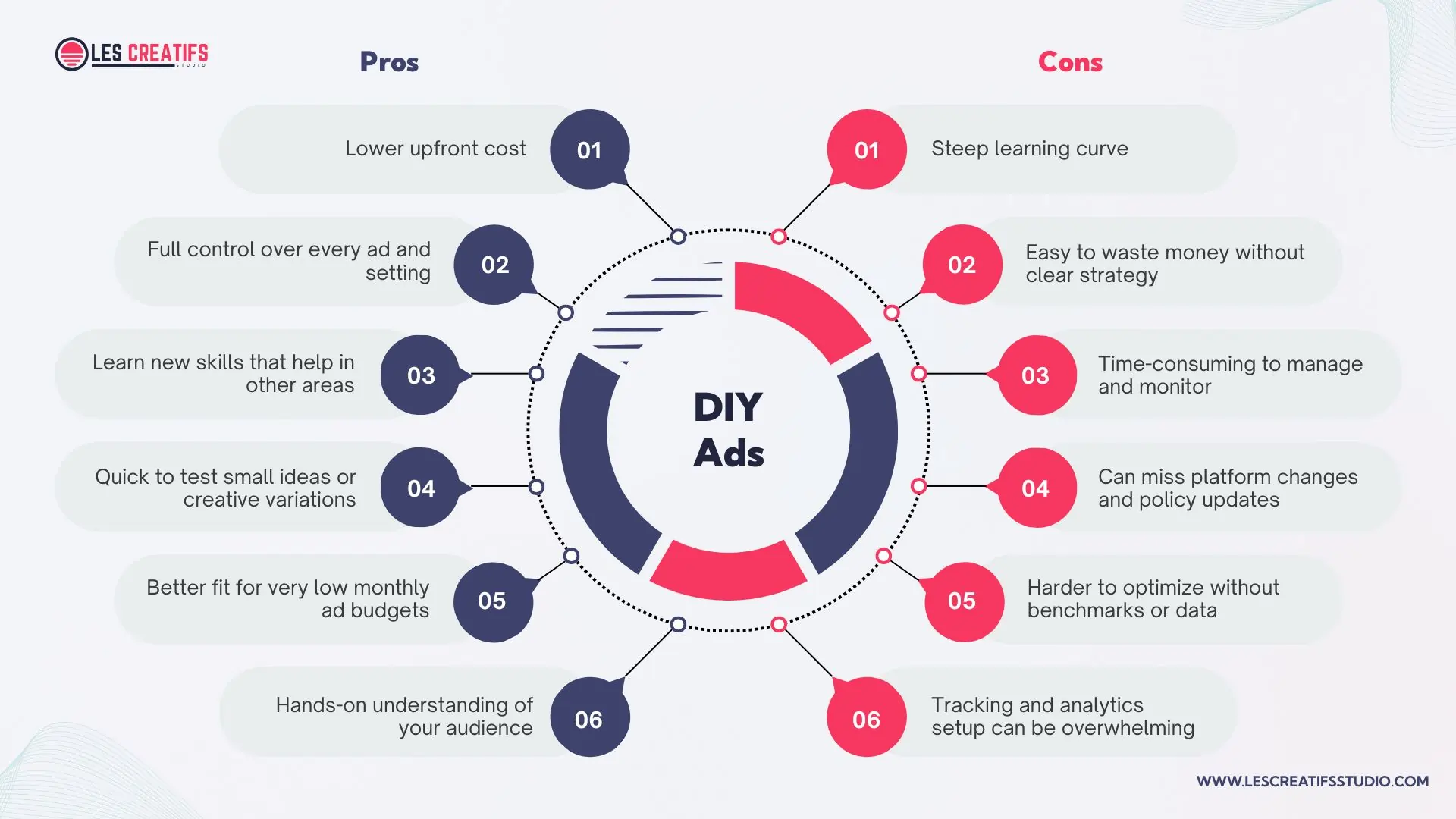
Pros and cons of managing Google or Meta ads yourself as a small business owner
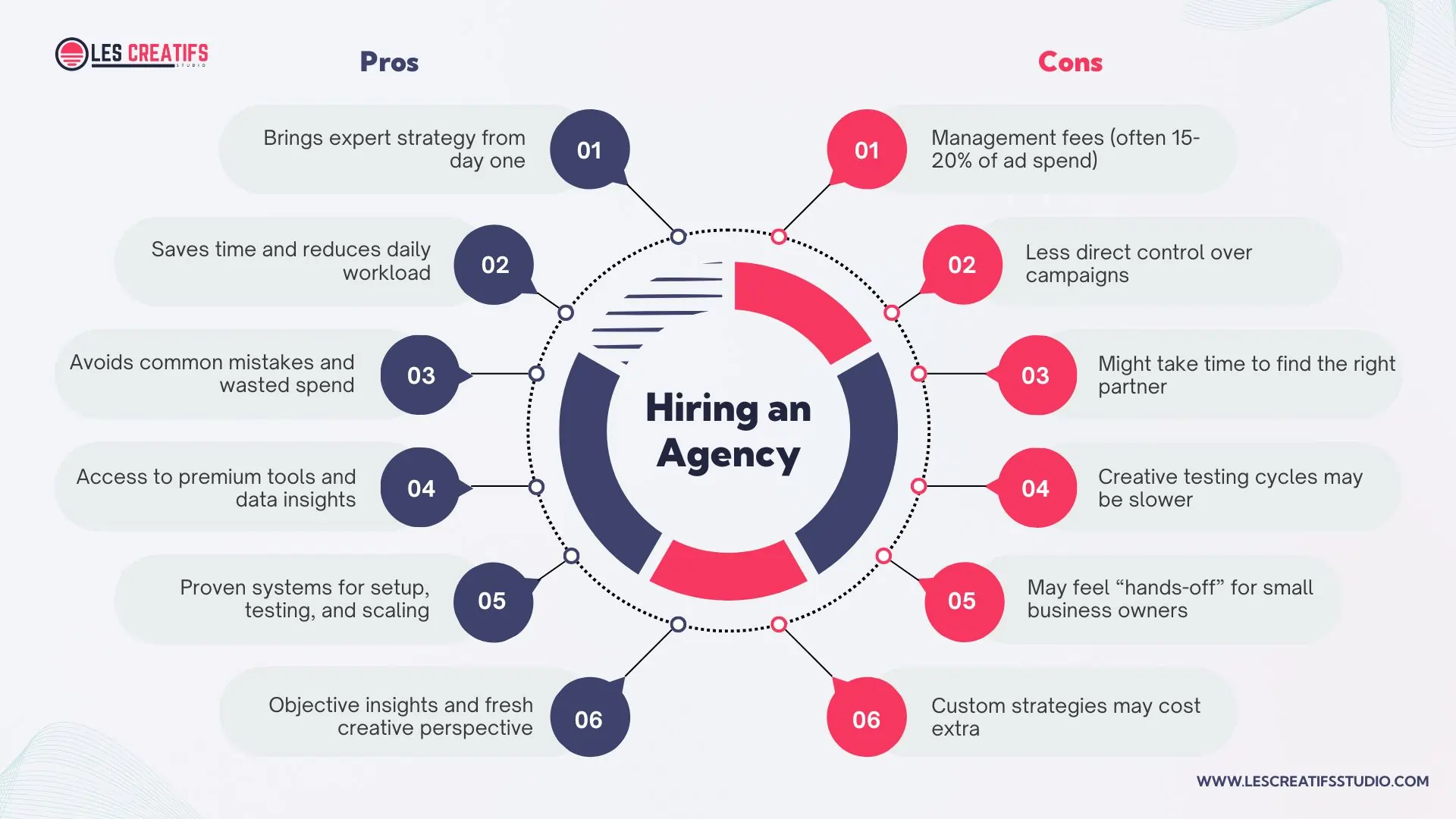
Pros and cons of hiring an ad agency to manage Google or Meta ad campaigns
DIY works well when your budget is under $2,000 per month, and you have time to learn. But managing Google Ads or Meta Ads is not as simple as clicking a boost button. You’ll need to understand targeting, bidding, creative testing, and how to track performance correctly.
Decision Checklist
Ask yourself these questions:
-
Do I have at least 5 to 10 hours a week to work on ads?
-
Am I comfortable testing, failing, and learning as I go?
-
Is my budget small enough that early mistakes won’t hurt?
-
Am I looking to scale fast or just test the waters?
If your time is limited or you’re unsure about where to start, hiring a pro might actually save you money in the long run.
When to Switch
Here’s a rule I often use: If your return on ad spend (ROAS) is under 2x after three months of DIY ads, consider bringing in expert help. Low ROAS usually means something’s off, your targeting, copy, or platform choice. A good ad specialist can fix these faster than trial and error.
Even if you start by doing it yourself, that doesn’t mean you have to stick with it forever. Many of my clients begin DIY, then bring us in to scale once they know their offer converts. That hybrid path works well for small teams.
Hybrid Funnel Strategy
A hybrid ad strategy blends Google Ads and Meta Ads to guide users through every stage of your marketing funnel. Instead of choosing one platform, you use both to support awareness, engagement, and conversion. This works well for small businesses that want the most out of their budget.
What is a hybrid ad strategy?
Meta Ads are great for the awareness stage. These show up in the feed or stories where people aren’t actively looking to buy but are open to discovering new brands. A strong reel, carousel, or short video can build interest without asking too much.
Once users interact with your ad or visit your site, you can retarget them using Meta again. This middle layer builds trust. You might show a testimonial, a product feature, or a time-sensitive offer to bring them closer to a decision.
Finally, Google Ads come in at the conversion stage. When users are searching for a solution, your search or shopping ad can show up at the right moment. This is where most purchases happen, especially for service-based businesses or e-commerce brands.
How to split a small budget
If your total budget is $1,000 per month, here’s a good starting point:
-
$400 for Meta awareness campaigns
-
$300 for Meta retargeting
-
$300 for Google Ads focused on conversions
Track performance using UTM tags and compare the return on each segment. As results come in, shift spend toward what’s working.
Keep your branding consistent
It’s important that your copy, images, and offers match across platforms. If Meta ads say “Free 14-Day Trial,” your Google ads and landing pages should say the same. This consistency builds trust and improves conversions.
For a deeper look at why brand consistency matters, read Why Brand Identity and Brand Guidelines Matter for Success. You’ll learn how visuals, tone, and messaging support ad performance.
You can also check this guide from Search Engine Journal to see how global brands build full-funnel strategies using blended platforms.
Landing Pages – The Missing Link
Running great ads means nothing if the landing page doesn’t convert. It’s often the part business owners forget to fix. You could be wasting clicks simply because the page isn’t doing its job.
What makes a landing page work?
A strong page loads fast, works well on mobile, and gives one clear action. Aim for a load time under 2 seconds. Make sure it looks good on phones. And don’t try to say everything. Just guide the user toward one thing: buy, book, or sign up.
Where most pages go wrong
Many small business pages have too much text, confusing layouts, or messages that don’t match the ad. If someone clicks an ad for a free trial but lands on a page about features, they’ll leave. Pages also fail when the forms are too long or the buttons are hard to find.
How to fix it
Use tools like Hotjar to track where people drop off. Cut your form fields to just what you need. Try different call-to-action buttons like “Start Free Trial” or “See Plans.” Small changes like this can double your conversions.
Your ad is only as good as where it leads.
Check your speed with Google PageSpeed Insights. And if you’re still building your site, read The Best Website Builder for Small Business. A faster, cleaner page could make all the difference.
Conclusion and Key Takeaways
If you’re deciding between Google Ads or Meta Ads, it doesn’t have to be a guess. The best strategy starts with knowing your audience and matching that to the right platform. Google helps you reach people ready to buy. Meta helps you build trust and stay visible.
Here’s what matters most:
-
Google = search intent
-
Meta = brand awareness
-
Test both and adjust your budget monthly
-
Use automation, but review performance manually
-
DIY works for tight budgets, but hire help if growth stalls
-
Fix your landing page before spending more
Start simple. Run a 30-day ad experiment across both platforms. Track your CTR, CPA, and ROAS every week. Use what you learn to adjust, improve, and grow.
Looking for more tips? Visit our Insights Page for hands-on guidance.
FAQ
Which is cheaper: Google Ads or Meta Ads?
Meta Ads usually cost less per click. But Google Ads may convert better for high-intent users. The right platform depends on your goals and audience.
How much should a small business spend on online ads?
Most small businesses spend 5 to 15 percent of their revenue. You can start with as little as $500 per month. Track results and adjust as you learn.
Can you trust Google Performance Max or Meta Advantage+?
These tools help automate your campaigns, but they’re not perfect. You still need to monitor results and set limits. Use them to save time, not to replace strategy.
Is it better to hire an agency or run ads myself?
If your budget is below $1,000, DIY might be best. If you’re spending more or scaling fast, an expert can save time and boost returns.
How do I know if my landing page is ready for paid traffic?
Your page should load in under 2 seconds, be easy to use on mobile, and match your ad message. Use tools like Hotjar or Google PageSpeed to check.
Is Facebook Ads cheaper than Google Ads?
Yes, Meta Ads (Facebook and Instagram) often have a lower cost-per-click than Google Ads. But cheaper clicks don’t always mean better results. Meta is better for awareness and engagement. Google tends to drive more direct actions like purchases or sign-ups.
How much should a small business spend on ads?
Start with 5 to 15 percent of your monthly revenue. That usually means $500 to $3,000 per month. Begin with high-intent search ads, then expand to social and retargeting once you see results.
The post What to Know Before Spending on Google Ads or Meta Ads appeared first on Best Media Agency.
]]>Google Veo 3 helps small businesses create short, polished video ads using AI. You can use these videos in Google and Meta ads to grab attention, save time, and improve ad performance. This article explains how to integrate Veo 3 into your campaigns, test results, and boost ROI. Even if you have a small team or a tight budget.
What Is Google Veo 3?
Google Veo 3 is Google’s AI video tool for creating video content from text. These videos work well on platforms like YouTube, Meta, and the Google Display Network. Veo 3 generates full HD videos with natural movement, realistic visuals, and built-in sound like dialogue or ambient effects.
You can access Veo 3 through Google’s Flow platform, which is part of their AI filmmaking studio. To use it, you need the AI Ultra plan. The process is simple. Upload a script, select your style and tone, and the tool gives you a polished video. It often takes just a few minutes.
Unlike earlier video tools, Veo 3 supports realistic animation and sound together. You don’t need to stitch clips or add voice later. The export is complete and ready for advertising.
Integrating Google Veo 3 into your ads means using these videos across formats. You can run them in YouTube In-Stream ads, Google Discovery ads, or on social platforms like Facebook and Instagram. These short videos are designed to hold attention and encourage clicks.
In short, Google Veo 3 ad integration helps small businesses and startups create high-quality video ads fast. It cuts costs, saves time, and removes the need for production teams.
Benefits of AI Video Marketing Tools
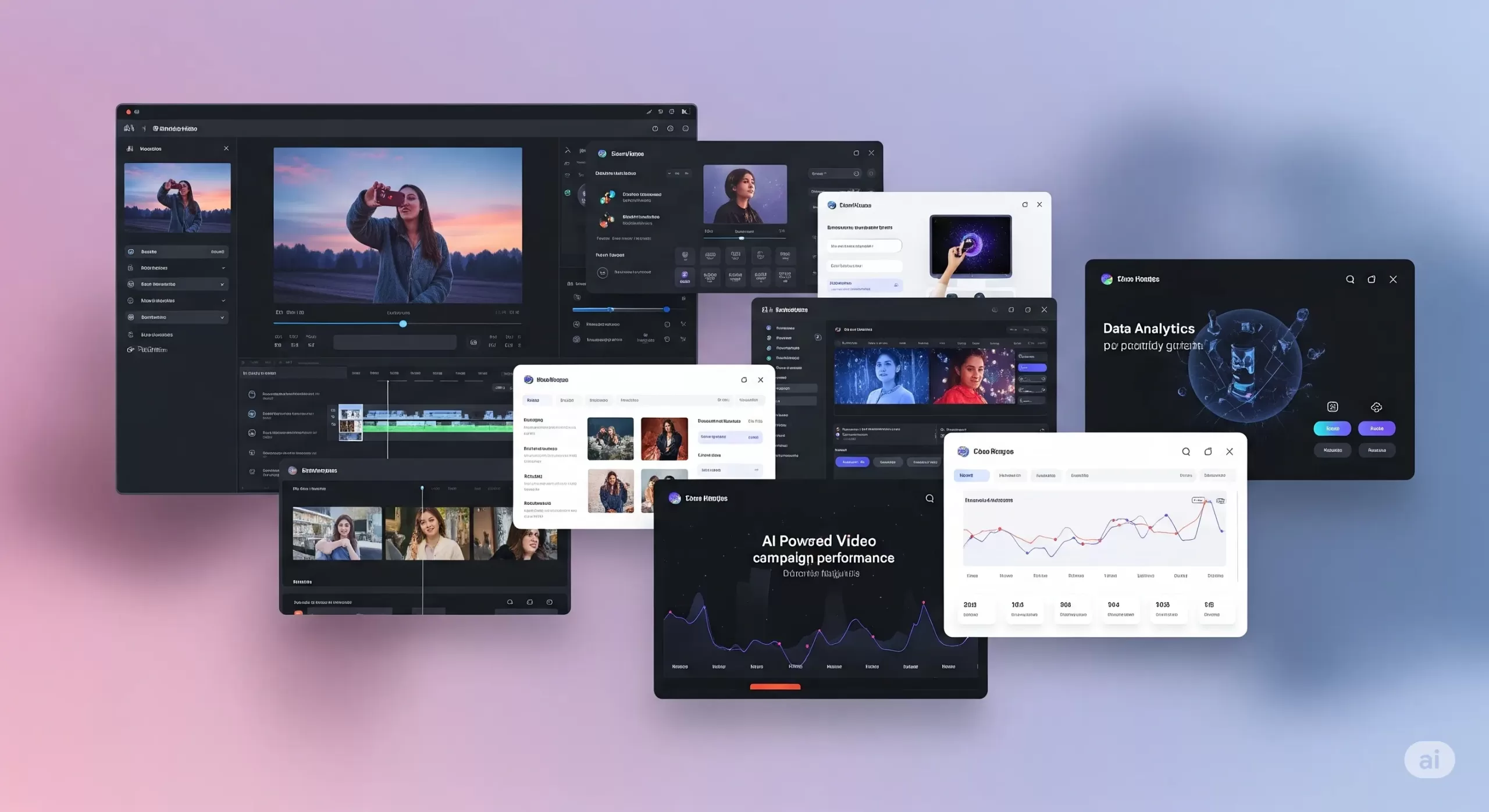
Integrating Google Veo 3 into ad campaigns makes a real difference. Video ads capture attention in ways static images cannot. With AI video ad tools, you can quickly create engaging clips without complex editing skills. These tools use advanced algorithms to generate smooth animations and dynamic visuals that feel professional.
How AI Video Helps Small Businesses Do More with Less
If you’re running a small business, you’re probably juggling ads, design, and content, and trying to stand out online. Traditional video production takes a lot—time, money, editing skills, and people. That’s why AI video marketing tools are changing the game.
With tools like Google Veo 3 integration, you can create short, high-quality videos without hiring a crew. You don’t need a camera. You don’t need actors. Just write a script or upload a few images, and the tool builds a video for you, complete with animation, voice, and background sound.
This helps you move faster. You can launch ads quickly and test more ideas without wasting time. Want to see which intro grabs attention? Or which version of your product video performs better? AI video ad tools let you create and compare variations in hours, not weeks.
Even better, these tools are built for small teams. The video quality looks polished. You can control the fonts, colors, and style, so everything feels on-brand. A small clothing brand can produce an Instagram reel that looks just as clean as a big-name fashion ad.
These AI-powered video marketing tools also give you an edge when it comes to performance. Video ads tend to get more clicks than static images. If your goal is leads or sales, this matters. The tools fit right into your performance-based marketing strategies. You can track views, clicks, or purchases, and only pay for the actions that matter.
Some tools even help make content safer. For example, Google filters content created with Veo to avoid misuse. That keeps your brand protected while still being creative.
In short, artificial intelligence video marketing tools help you create content that’s fast, consistent, and built to convert. They help small businesses compete without using up too much time or money.
Integrating Google Veo 3 into Google Ads Campaigns
A Beginner-Friendly Guide to Smarter Video Ads
Adding Google Veo 3 integration to your Google Ads campaign might sound complex, but it’s not. Whether you’re running your first ad or already experimenting with video, this guide breaks it down in simple terms.
Where Veo 3 Videos Can Show Up
You can use Veo 3’s AI-generated videos in three key Google ad formats:
-
YouTube In-Stream Ads (TrueView): These short videos play before or during other YouTube content. Viewers can skip after 5 seconds. Use this space for a 10–15 second clip that delivers your message fast.
-
Discovery Video Ads: These appear alongside YouTube search results and related videos. The video appears with a headline and thumbnail that invites clicks.
-
Display Network with Video: Instead of a static banner ad, your video can be shown across websites and apps that support video placements. Great for visibility across the web.
To add a Veo 3 video to your campaign:
-
Download your video as an MP4 from the Veo 3 dashboard.
-
Log in to Google Ads and create a new campaign.
-
Choose “Video” as the campaign type.
-
Select your goal, like “Website Conversions” or “Brand Awareness.”
-
Upload your video and follow the prompts.
No coding or special tools needed.
Google Ads Best Practices for Veo 3 Video
Want your video to perform well? Keep it simple and focused.
-
Grab attention early. Show your brand or message in the first 3–5 seconds.
-
Add a clear CTA. Text like “Shop Now” or “Learn More” should be on screen. Veo 3 lets you add these as text panels or end cards.
-
Use captions. Many viewers watch with the sound off. Add on-screen text to make your message clear.
Before launching, check these things:
-
Video resolution: at least 720p
-
Audio: Clear and not too loud
-
Text size: Easy to read on mobile
These small steps help with Google Ads campaign optimization.
Bidding and Targeting for AI Video Ads
When you run video ads, you need to set a budget and bidding method. Here are two common ones:
-
CPV (Cost per View): You pay only when someone watches 30 seconds or the full video.
-
CPA (Cost per Acquisition): You pay when someone takes a specific action, like signing up or making a purchase.
Targeting helps your video reach the right people:
-
Demographics: Age, gender, location.
-
In-market audiences: People actively shopping for products like yours.
-
Custom intent: You choose keywords your ideal customer might search.
If you notice that one group (say, women aged 25–34) is responding better, you can increase bids just for them. That’s how Google Ads optimization works—adjusting based on performance.
A/B Test Your Veo 3 Ads
Don’t guess. Test.
-
Create two versions of your Veo 3 video. One could have a voiceover, the other just text.
-
Run both at the same time with equal budget.
-
Compare these metrics:
-
View rate
-
Click-through rate (CTR)
-
Conversion rate
-
Pause the lower-performing ad and shift budget to the better one.
For more help, read our guide on the best Google Ads automation & optimization tools for 2025.
Track Performance Like a Pro
Once your ads run, check your metrics:
-
View Rate: How many people watched at least 30 seconds
-
CTR: How many clicked after seeing the video
-
Conversions: How many signed up, bought, or filled out a form
These numbers support performance ad strategies. If your goal is ROI, track cost vs. return. For example, if you spend $100 and make $500, your return is 5×.
Use these results to guide your next steps. Keep high-performing Veo 3 videos, and pause the rest. Over time, you’ll build a reliable library of content that works.
Enhancing Meta Ads with AI Video
How to Use Google Veo 3 Videos on Facebook and Instagram
Meta platforms like Facebook and Instagram are some of the best places to use short videos. People scroll fast, and a good video can get them to stop. If you’re already using Google Veo 3 integration, you can reuse those videos in your Meta campaigns for stronger engagement.
Where to Use Veo 3 Videos on Meta
There are several ways to place your videos across Meta platforms:
-
Feed Video Ads: These appear like regular posts in Facebook or Instagram feeds. A strong thumbnail and headline can increase views.
-
Stories and Reels: These are vertical, full-screen videos that appear in short-form formats. They work well on mobile devices and often get high reach.
-
Carousel Video Ads: Use this format to showcase different video clips. It’s useful when you want to display several products or steps in one campaign.
You can upload your AI-generated videos from Veo 3 directly into Meta’s Ads Manager.
Follow These Meta Advertising Best Practices
For better results, follow these proven tips based on Facebook and Instagram Ads best practices:
-
Use mobile-friendly formats. Square (1:1) or vertical (9:16) works best on phones.
-
Add captions. Many users watch videos on mute. On-screen text helps communicate your message clearly.
-
Catch attention early. The first three seconds matter most. Use movement, a bold headline, or your product right away.
-
Keep videos short. Meta recommends under 15 seconds for Stories and Reels.
These are simple ways to follow Meta advertising best practices and improve performance.
Test Video Performance With A/B Comparison
Not sure if video will work better than images? Test it.
-
Make two or more versions of your Veo 3 video. Change things like the voiceover, captions, or visuals.
-
Run them alongside a static image ad.
-
Check results. Look at click-through rate, video views, and conversions.
Keep the version that performs best. This is how many small businesses improve results using Meta ad strategies.
Smart Targeting for Better ROI
Meta has advanced targeting tools. Use them with your Veo 3 ads to reach the right people:
-
Interest targeting: Choose people interested in things like skincare, fitness, or tech.
-
Lookalike audiences: Find people similar to your current customers.
-
Custom audiences: Retarget users who visited your site or interacted with past posts.
You can also retarget people who watched your Veo 3 video but didn’t click. This is part of performance ad strategies. You only spend money on people who have already shown some interest.
Should You Use AI Video for Meta Ads?
Yes. Here’s why:
-
It helps your brand stand out in crowded social feeds.
-
It’s faster and cheaper than traditional video production.
-
It lets you test creative ideas quickly.
For a full comparison of ad platforms, read:
👉 The Truth About Google Ads vs Facebook Ads
Performance Marketing Strategies with AI Video
Simple Ways to Track Results and Improve Campaigns
If you’re spending money on ads, you should know exactly what you’re getting back. That’s what performance marketing strategies are all about. Instead of guessing, you track what works, fix what doesn’t, and keep improving. When you pair this with smart tools like Google Veo 3 integration, it’s easier to make better decisions, even on a small budget.
Focus on ROI, Not Just Views
It’s easy to chase likes or views. But for small businesses, the goal is usually action — a sale, signup, or message.
Here’s how to use ROI-driven marketing strategies:
-
Track conversions. How many people clicked your ad and did something useful, like buy a product or join your list?
-
Compare results. Did your Veo 3 video lead to more actions than a static ad?
-
Watch video completion. If people only watch a few seconds, try a different approach.
This shift from vanity metrics to real results is the core of performance-based marketing strategies.
Smarter Bidding to Save Time and Money
Ad platforms let you choose how to pay:
-
CPA (Cost Per Acquisition): You only pay when someone takes a specific action.
-
ROAS (Return on Ad Spend): You set a goal like “earn 3x what I spend.” The platform tries to meet that target.
Both work well when you track conversions. These are part of performance ad strategies that put results first.
Test, Learn, and Improve
The best thing about tools like Veo 3 is how quickly you can make new videos. If something isn’t working, update your creative and try again the same day.
Look at key data points like:
-
Click-through rate (CTR)
-
View duration
-
Cost per action
If one version performs better, shift more budget to it. Pause the others. That’s how you run smarter campaigns without spending more.
Stay Consistent Across Channels
If you’re using both Google and Meta ads, your messaging should match. Your audience should see the same tone, style, and offer wherever they go. This creates trust and helps guide people smoothly from ad to website.
Use Retargeting to Bring People Back
Sometimes a person watches your Veo 3 video but doesn’t take action. That’s normal. But you can bring them back.
Set up retargeting ads that show a second video, a new offer, or a reminder. You’re focusing on people who already showed interest. This often gives better results than starting from scratch.
Frequently Asked Questions
What is Google Veo 3 integration?
Google Veo 3 integration means using AI-generated videos from Google’s Veo 3 tool in your marketing campaigns. These videos are short, high-quality, and include natural sound and motion. Businesses can upload them to Google Ads or Meta Ads to make ads more engaging.
Can small businesses use Veo 3 without technical skills?
Yes. Veo 3 is designed to be simple. You upload a script or image, and the tool creates a ready-to-use video. Then, platforms like Google Ads or Meta Ads walk you through the steps to launch your ad. No advanced editing or coding is needed.
How do Veo 3 videos improve ad performance?
These videos often have higher click-through and view rates. That’s because they look professional and grab attention quickly. When paired with performance marketing strategies, they can lead to more conversions and better return on ad spend.
Where can I use Google Veo 3 videos?
You can use them in:
-
Google Ads (YouTube, Display, and Discovery ads)
-
Facebook and Instagram (Stories, Reels, Feed posts, and Carousels)
These videos work across platforms and devices.
Do I need a special plan to use Veo 3?
Yes. As of now, access to Veo 3 is included with Google’s AI Ultra plan under the Flow platform. It may change, so always check Google’s official documentation for current requirements.
Are these AI videos safe and brand-friendly?
Yes. Google Veo 3 includes filters to prevent inappropriate content. You can also control the visuals, tone, and message, ensuring everything aligns with your brand.
Can I test different Veo 3 video versions in ads?
Absolutely. A/B testing is easy with Veo 3. You can make multiple versions, change voiceovers, images, or calls to action, then track which version performs best using platform analytics.
How does this fit into a performance-based marketing strategy?
You only spend money when people take action, like watching a video or making a purchase. AI video tools like Veo 3 help you create better ads faster, test them quickly, and focus your budget on what works.
How do I connect Veo 3 videos to my website?
Use a landing page that supports video. Make sure it loads fast, looks good on mobile, and matches the message from your video ad. This helps improve user experience and increases conversions.
Conclusion and Next Steps
Google Veo 3 integration gives small businesses a way to create standout video ads without a big budget or team. These AI-powered videos are short, polished, and optimized for platforms like Google and Meta.
What matters most is performance. With the right strategy, AI video tools can increase engagement, reduce production time, and boost conversions. You get more from your ad spend, and you can track every step.
Even Google confirms that video-first strategies drive higher engagement and ROI, especially when paired with strong visuals and relevant targeting.
Source: Google Ads Help – Video Campaign Best Practices
If you’re ready to try this approach, start small. Test one Veo 3 video. Track your results. Build from there.
And if you need help?
Les Creatifs Studio can support you with AI video ads, Google Veo 3 setup, and campaign optimization.
Let’s make your ads work harder — without overcomplicating them.
The post Boost Your Ad Results With Google Veo 3 Integration appeared first on Best Media Agency.
]]>If you’re serious about outperforming your rivals, make sure your campaigns are powered by the right tools. Our guide to the best Google Ads automation and optimization tools for 2025 will help you scale smarter.
In this guide, you’ll discover 10 free methods and tools—from Google’s own Auction Insights report to clever DIY scripts—that empower you to:
-
Gain actionable insights into competitors’ budgets and strategies
-
Identify high‑value keywords they’re targeting (and missing)
-
Fine‑tune your ad copy, bids, and landing pages for maximum ROI in 2025
Ready to outsmart your competition? Let’s dive in.
Why Google Ads Competitor Analysis Matters
Before you invest time and budget into new campaigns, it pays to know what your competitors are up to. Understanding who your AdWords competitors are and what they’re bidding on is the first step to outperforming them. Here’s why conducting regular competitor analysis should be non‑negotiable for any savvy advertiser:
-
Uncover Winning Strategies
Competitors’ ad copy, keywords, and promotions reveal what resonates with your shared audience. By reverse‑engineering their top‑performing ads, you can adapt high‑impact headlines, offers, and calls‑to‑action for your own campaigns. -
Optimize Budget Allocation
Insights into competitors’ impression share and ad position help you understand where they’re outbidding you—and where you can outsmart them. Shift spend toward high‑opportunity keywords and times of day for better ROI. -
Identify Untapped Keyword Opportunities
Seeing which keywords competitors target (and which they ignore) uncovers gaps you can exploit. Adding these overlooked terms to your keyword list can drive lower‑cost clicks and new conversions. -
Benchmark Performance Metrics
Measuring your campaigns against competitors’ metrics—such as click‑through rate (CTR), cost per click (CPC), and conversion rate—gives you objective benchmarks. You’ll know whether your results are industry‑leading or need improvement. -
Stay Ahead of Market Shifts
The digital ads landscape evolves daily. Regularly “spying” on competitor ads keeps you alert to new promotions, seasonal pushes, or emerging creative trends—so you can pivot faster and maintain an edge.
By making competitor analysis a cornerstone of your Google Ads workflow, you transform guesswork into data‑driven decisions. Next up, a quick overview of the 10 free tools and methods you’ll use to gain these insights.
How to Use These Free Competitor Analysis Tools (Quick Tips)
Before diving into each method in detail, here’s a quick‑hit overview of all 10 free ways to uncover your competitors’ Google Ads strategies. Click any item to jump to that section:
-
Google Ads Auction Insights Report – Compare impression share, overlap rate, and outranking share.
-
Google Ads Transparency Center – Browse competitors’ live ad creatives and spend trends.
-
Google Keyword Planner Competitive Metrics – Discover competitor keyword bids, search volume, and keyword gaps.
-
Manual SERP Searches & Ad Preview Tool – Perform targeted searches and use Google’s Ad Preview to see exact competitor ads.
-
Google Trends for Competitor Keywords – Compare brand vs. competitor keyword interest over time.
-
SpyFu Free Version – Pull limited free data on competitor keywords, ad history, and ad copy.
-
Ubersuggest Competitor Report – Extract top competitor ad keywords and estimated traffic.
-
SimilarWeb Free Insights – Use traffic overview to infer competitor ad spend and top channels.
-
Google Sheets + Ad Scripts – Automate competitor data collection with free Google Ads scripts and Sheets.
-
Browser DevTools & Free Extensions – Inspect network calls or use extensions to capture competitor ad parameters.
Free Google Ads Native Tools
Google’s own platform offers powerful, no‑cost features to peek into competitor performance. Start here before exploring external solutions.
1. Google Ads Auction Insights Report
-
What It Shows: Impression share, overlap rate, position above rate, and outranking share for each competitor in your auctions.
-
How to Access
-
Sign in to your Google Ads account.
-
In the left menu, click Campaigns, Ad groups, or Keywords.
-
Select the specific campaign, ad group, or keyword to analyze.
-
Click the “Auction insights” tab or choose Segments → Auction insights from the top menu
-
-
Key Metrics Defined
-
Impression share: Your impressions divided by total eligible impressions.
-
Overlap rate: How often a competitor’s ad appears alongside yours.
-
Outranking share: How often you rank higher than a given competitor.
-
Position above rate: How often a competitor’s ad shows above yours.
-
- Pro Tip Validation
Focusing on keywords where your impression share is under 50% is a common best practice to reveal bidding/budget gaps
2. Google Ads Transparency Center
-
What It Shows
-
A searchable library of all active ads run by verified advertisers across Google Search, YouTube, Display, and Discover.
-
For each ad: creative, formats, date range, and regional delivery.
-
-
How to Access
-
Visit ads.google.com/transparency.
-
Enter an advertiser’s name or domain in the search bar.
-
Filter by region, date range, and ad format.
-
-
Benefits Confirmed
-
See live ad creatives and historical run dates.
-
Export ad data for trend analysis.
-
3. Google Keyword Planner Competitive Metrics
-
What It Shows
-
Estimated bid ranges (low and high), average monthly search volume, and “Advertiser competition” index for each keyword.
-
-
How to Access
-
In Google Ads, go to Tools & Settings → Planning → Keyword Planner.
-
Select “Discover new keywords” and enter seed keywords or competitor URLs to find competitors AdWords keywords.
-
Review columns: “Avg. monthly searches,” “Competition,” “Top of page bid (low range),” and “Top of page bid (high range).”
-
-
Key Insights Validated
-
High bid estimates correlate with competitive focus.
-
“Advertiser competition” (low–high) indicates relative auction competition—essential for any competitor research AdWords effort.
-
-
Pro Tip Validation
Filtering by low competition and decent volume uncovers under‑served keywords, a standard tactic in PPC optimization.
Free SERP‑Based Methods
4. Manual SERP Searches & Ad Preview Tool
- What It Is
- A zero‑cost way to see exactly which ads appear for any query, device, or location—without influencing auction data.
- How to Use
-
Open an incognito/private browser window and go to Google.com.
-
Enter your target keyword(s) and note all ads at the top and bottom of the results.
-
For precise targeting by location, language, or device, use Google’s Ad Preview and Diagnosis tool under Tools & Settings → Ad Preview and Diagnosis in your Google Ads account.
-
Select your desired market (country, language, device) and keyword to preview live competitor ads without affecting your Quality Score or impression share data.
- Why It Helps
-
You view exact ad copy, extensions, and sitelinks as real users see them.
-
You can benchmark seasonal or local ad variations by adjusting preview settings.
5. Google Trends for Competitor Keywords
-
What It Shows
-
Relative search interest over time for any terms (e.g. your brand vs. competitor brand).
-
Regional interest breakdown and related rising queries.
-
-
How to Access
-
Go to trends.google.com.
-
Enter two or more terms (e.g. “YourBrand” vs. “CompetitorBrand”).
-
Use the “Compare” feature to add additional keywords or categories.
-
Filter by time range and geography to spot trend shifts.
-
-
Benefits Confirmed
-
Detect competitor campaign ramp‑ups via brand‑search spikes.
-
Uncover seasonal and emerging keyword opportunities.
-
Free Third‑Party Tools (Limited Free Tiers)
Several SaaS platforms offer free versions or trials that let you peek at competitors’ Google Ads data—providing a lightweight Google AdWords competitor analysis without cost. While their full feature sets require paid plans, you can extract useful insights for Google AdWords competitor analysis free of charge.
6. SpyFu Free Version
-
What It Shows
-
Top paid keywords, ad copy history, and estimated monthly PPC spend for a given domain.
-
Historical trends in competitor ad messaging.
-
-
How to Access
-
Sign up for a free account at spyfu.com (no credit card required).
-
Under PPC Research, enter your competitor’s domain.
-
Run up to 5 free searches per day to view their paid keywords and ad variations.
-
-
Benefits Confirmed
-
Benchmark competitor budget and keyword focus.
-
Learn from historical ad copy changes to inform your own messaging.
-
7. Ubersuggest Competitor Report
-
What It Shows
-
Competitor’s top paid keywords, CPC estimates, and search volumes.
-
Seasonal trends and keyword gap opportunities.
-
-
How to Access
-
Visit ubersuggest.com and enter a competitor’s domain.
-
Click “Paid Keywords” in the sidebar to load their PPC data.
-
Export the CSV to analyze keywords, CPC, and volume offline.
-
-
Benefits Confirmed
-
Identify high‑value keywords your competitors prioritize.
-
Spot under‑bid or unaddressed keywords for cost‑efficient expansion.
-
8. SimilarWeb Free Insights
-
What It Shows
-
High‑level traffic distribution (Paid Search vs. Organic, Direct, Referral).
-
Top paid keywords (when available on free tier).
-
-
How to Access
-
Go to similarweb.com and enter a competitor’s domain.
-
Under Traffic Sources, note the % from Paid Search.
-
Scroll to Top Paid Keywords for a peek at their main ad-driving terms.
-
-
Benefits Confirmed
-
Infer competitor ad spend focus by paid vs. organic ratios.
-
Quickly harvest competitor PPC keywords for your own campaigns.
-
DIY Competitor Data Collection Methods
Custom, zero‑cost approaches that empower you to research competitor ads and build your own data‑gathering workflows—no paid software needed. Use Google Ads scripts, Google Sheets, browser automation, or simple scrapers to continuously capture and analyze competitor auction metrics and ad parameters.
9. Google Sheets + Ad Scripts
-
What It Shows
-
Automated, time‑series export of Auction Insights metrics (impression share, overlap rate, etc.).
-
Custom competitor performance dashboards in Sheets.
-
-
How to Access
-
In Google Ads, navigate to Tools & Settings → Scripts and create a new script.
-
Use
AdsApp.report()to pull the desired Auction Insights fields. -
Link the script to a Google Sheet and schedule it to run daily/weekly.
-
Build pivot tables or charts in Sheets to visualize competitor trends.
-
-
Benefits Confirmed
-
Hands‑off data collection preserving historical competitor benchmarks.
-
Fully customizable metrics and reporting cadence at zero cost.
-
10. Browser DevTools & Free Extensions
-
What It Shows
-
Raw ad‑request payloads (audience IDs, ad parameters, creative hashes).
-
Hidden metadata behind dynamic or script‑served ads.
-
-
How to Access
-
Open a competitor’s landing page; press F12 to launch Chrome DevTools.
-
Go to the Network tab and filter by XHR/Fetch to see ad request URLs and parameters.
-
Optionally install free extensions (e.g. EditThisCookie, Requestly) to log or modify ad calls automatically.
-
-
Benefits Confirmed
-
Exposes advanced targeting parameters and dynamic ad mechanics.
-
Enables reverse‑engineering of competitor A/B tests and script‑driven creatives.
-
With these standardized tool profiles—each detailing What It Shows, How to Access, and Benefits Confirmed—you have a clear, consistent format that’s both user‑friendly and SEO‑optimized.
How to Analyze & Action Your Findings
Step 1: Consolidate & Visualize Your Data
Once you’ve gathered all your competitor data, the real magic happens when you turn those raw insights into strategic improvements. Start by consolidating everything—Auction Insights exports, SERP screenshots, and CSVs from SpyFu, Ubersuggest, and SimilarWeb—into a single Google Sheet or Data Studio dashboard. From there, scan for high‑impact gaps: keywords where your impression share lags behind rivals, ad extensions they run that you haven’t tested, or bidding patterns that reveal under‑served terms.
Step 2: Audit & Hypothesize
Next, audit your own campaigns against these findings. Compare your ad headlines, descriptions, and landing‑page offers side‑by‑side with the competitor examples you collected. You’ll quickly spot messaging angles, CTAs, or promotional hooks they use that you lack. If your headlines aren’t pulling enough attention, learn how to write headlines that captivate in just 8 seconds to boost engagement.
Use those observations to craft A/B tests—create new ad copy variants inspired by top competitor headlines, add the same sitelinks or callouts they leverage, and test different value propositions. Meanwhile, reallocate budget based on the gaps you uncovered: raise bids on high‑opportunity keywords where you’re under‑represented and pull spend away from overly competitive terms with low ROI. At the same time, refine your landing pages to mirror the strongest elements of your competitors’ pages—whether that’s a clearer headline, a more compelling offer, or faster load times—to not only attract clicks but also convert them more effectively.
Step 3: Automate & Iterate
Finally, make this a continuous cycle rather than a one‑off project. Schedule your Google Sheets script or Data Studio report to refresh Auction Insights and third‑party metrics weekly, and set up conditional formatting or alerts to flag when your impression share dips below a chosen threshold or a competitor launches a new ad extension. Keep a simple log of every test—what you changed, when, and the performance impact—so you build an institutional memory of what works. Over time, this disciplined, data‑driven process will transform competitor intelligence into sustained performance gains for your Google Ads campaigns.
10 Key Metrics to Track in Competitor Analysis
Once you’ve collected competitor data, focus on these essential metrics, such as impression share, overlap rate, and each AdWord competitor keyword’s performance to benchmark your campaigns and uncover actionable insights.
-
Impression Share: The percentage of total eligible impressions your ads receive compared to competitors. Low share on high‑value keywords reveals bidding or budget gaps you can exploit.
-
Overlap Rate: How often a competitor’s ad appears alongside yours. A high overlap rate with a top rival indicates you’re targeting the same auctions—adjust bids or test differentiated ad copy to stand out.
-
Outranking Share: The percentage of times your ad ranks higher than a specific competitor when both appear. Use this to identify which competitors you consistently beat and which ones require strategic bid increases.
-
Average CPC (Cost‑Per‑Click): Compare your CPC against competitors’ estimated bids (from Keyword Planner or third‑party tools). If your CPC is significantly higher, refine Quality Score factors; if lower, consider raising bids to capture more volume.
-
CTR (Click‑Through Rate): A key indicator of ad relevance. Benchmark your CTR against industry averages and competitors’ reported rates; low CTR suggests your headlines or extensions need improvement.
-
Ad Position Distribution: Track the percentage of times your ads appear in top positions (1–2) versus lower slots. Falling below competitors in top positions signals the need for bid or Quality Score optimizations.
-
Ad Extension Usage: Inventory which extensions (sitelinks, callouts, structured snippets) competitors employ. Extensions boost ad real estate and CTR—mirror high‑impact extensions your rivals use.
-
Keyword Coverage Gaps: Identify high‑volume, low‑competition keywords that competitors target and you don’t. Adding these to your campaigns can yield cost‑efficient traffic.
-
Landing Page Experience: While not a direct auction metric, compare competitor landing page load times, mobile friendliness, and messaging alignment. Better landing experiences improve Quality Score and conversion rates.
-
Budget Share Estimates: From third‑party tools’ spend estimates or inferred via impression share and average CPC, estimate competitor budget allocation. This helps you gauge how aggressively they’re bidding and where to position your budget.
By systematically tracking these metrics—ideally in a dashboard that refreshes regularly—you’ll turn raw competitor data into clear performance benchmarks and strategic actions that close gaps and amplify your Google Ads ROI.
Common Pitfalls & How to Avoid Them
Even with the best tools and data, competitor analysis can misfire if you’re not careful. Here are the top pitfalls—drawn from industry experts—and how to sidestep them:
-
Relying on a Single Data Source
-
Pitfall: Leaning exclusively on one tool (e.g. only Auction Insights) gives an incomplete picture and can mislead your strategy.
-
Solution: Combine multiple methods—native tools, third‑party reports, manual SERP checks, and DIY scripts—to triangulate accurate insights.
-
-
Ignoring Contextual Factors
-
Pitfall: Treating competitor metrics (impression share, CPC) as absolute truths without accounting for budget caps, seasonality, or promotional events.
-
Solution: Always annotate your data with context—note holiday periods, product launches, or bid strategy changes that might temporarily skew metrics.
-
-
Over‑Emphasizing “Free” at the Expense of Depth
-
Pitfall: Focusing only on zero‑cost methods can leave out powerful paid tools that reveal deeper insights.
-
Solution: Use free tools as your base layer, but plan periodic audits with paid or trial versions of advanced platforms (SpyFu Premium, SEMrush, Ahrefs) for comprehensive checks.
-
-
Failing to Act on Insights
-
Pitfall: Collecting data without a clear action plan leads to dashboards that sit idle.
-
Solution: For every metric you track, define a corresponding action—e.g., if “overlap rate” exceeds 60%, create an A/B test for new ad copy or increase bids on that keyword. Build these actions into your workflow.
-
-
Neglecting Mobile and Geo Variations
-
Pitfall: Assuming competitor performance is uniform across devices and regions.
-
Solution: Segment your Auction Insights and Ad Preview checks by device type and location. Tailor bids, ads, and landing pages accordingly to match or exceed competitor performance in each segment.
-
-
Overlooking Ad Creative Evolution
-
Pitfall: Capturing competitor ads only once, then missing subsequent creative changes.
-
Solution: Schedule regular snapshots (via scripts or manual checks) and archive competitor ad creatives. Use versioned folders or Sheets tabs to track how messaging evolves over time.
-
-
Copying Competitors Blindly
-
Pitfall: Emulating competitor ad copy or landing pages without testing can lead to mediocre results or compliance issues.
-
Solution: Treat competitor ideas as hypotheses. Always run controlled A/B tests to validate whether their messaging resonates with your unique audience before rolling out broadly.
-
-
Not Tracking Conversion Metrics
-
Pitfall: Focusing solely on ad performance metrics (impressions, clicks) without linking to conversions.
-
Solution: Ensure robust conversion tracking (goals, e‑commerce, phone calls) is in place. Analyze competitor-inspired tests not just for CTR lift but for actual conversion and ROI impact.
-
By avoiding these common errors, you’ll ensure your free‑tool-driven competitor analysis produces reliable insights and drives measurable improvements in your Google Ads performance.
Frequently Asked Questions
Q1: How often should I run competitor analysis?
Aim to refresh your core competitor insights at least weekly. Auction Insights and DIY scripts can be scheduled daily or weekly to catch rapid shifts, while manual SERP checks and third‑party free‑tier tools can be done monthly for a broader view. Regular cadence prevents surprises and keeps your strategy agile.
Q2: Can I really get meaningful data without paid tools?
Yes—Google’s native reports (Auction Insights, Transparency Center, Keyword Planner) and free tiers of SpyFu, Ubersuggest, and SimilarWeb provide robust visibility into competitor keywords, ad copy, impression share, and spend estimates. Combining multiple free methods triangulates reliable insights without subscription costs.
Q3: What’s the single most important metric to watch?
Impression Share is the linchpin metric. It directly shows where competitors are outbidding you and where opportunities lie. A sudden drop in impression share on key terms signals it’s time to adjust bids, budgets, or ad relevance.
Q4: How do I avoid copying competitors too closely?
Treat competitor ads as hypotheses, not blueprints. Use A/B tests to validate any borrowed messaging or extensions. Always adapt language, offers, and CTAs to your unique value proposition and audience insights to maintain originality and compliance.
Q5: What if competitors block data collection?
If you encounter limitations (e.g., hidden auction data or scripts blocked), lean more on manual SERP previews, Google Trends spikes, and third‑party reports. You can also increase script frequency or diversify methods (e.g., browser DevTools + extensions) to ensure continuous visibility.
Conclusion & Next Steps
Conducting a thorough competitor analysis is not a one‑time task but an ongoing strategic practice that transforms raw data into measurable performance gains. By applying the 10 free tools and methods outlined above—from Google’s native Auction Insights and Transparency Center to DIY scripts and manual SERP checks—you gain a multidimensional view of your rivals’ Google Ads strategies. This holistic approach helps you identify high‑impact keyword gaps, refine ad copy and extensions, optimize bids and budgets, and ultimately boost your ROI in 2025.
Next Steps:
-
Implement the Framework: Consolidate all data in a single dashboard (Sheets or Data Studio), audit your campaigns against competitor benchmarks, run targeted A/B tests, and adjust bids and landing pages accordingly.
-
Schedule Regular Audits: Automate data collection with Google Ads scripts and refresh reports weekly. Supplement with monthly manual SERP and Trends checks to catch emerging shifts.
-
Expand to Paid Tools: Periodically run in‑depth audits using paid tiers of SpyFu, SEMrush, or Ahrefs to validate free‑tool findings and uncover deeper insights.
-
Leverage Rich Media & Schema: Enhance your article with infographics, video demos, and FAQ/HowTo schema to improve user engagement and earn rich results in SERPs.
-
Build Backlinks: Share unique case studies or data-driven insights from your analysis to attract authoritative backlinks—backlinks remain a top ranking factor.
By integrating these steps into your Google Ads workflow, you’ll outpace competitors, adapt swiftly to market changes, and secure sustained growth. Download the complimentary competitor analysis checklist below to put these strategies into action immediately.
Downloadable Competitor Analysis Checklist
Download free Competitor Analysis Checklist
The post Free Google Ads Competitor Analysis Tools: 10 Ways appeared first on Best Media Agency.
]]>Web design trends are not just about aesthetics—they reflect changing consumer behaviors, technological advancements, and digital innovations. A well-designed website enhances user experience, builds trust, and improves business outcomes. Ignoring these trends can result in outdated designs, slow-loading pages, and a frustrating user experience that drives potential customers away.
For designers, staying updated means mastering new design principles, tools, and interactive elements. Marketers must understand how web design influences user behavior, engagement, and conversion rates. Business owners need to invest in websites that attract and retain customers while strengthening brand identity.
In 2025, several key trends will dominate the digital landscape. Minimalist layouts, dark mode, immersive animations, AI-driven user experiences, and bold typography are leading the way. These trends prioritize usability, accessibility, and engagement while ensuring a seamless browsing experience. From micro-interactions to AI-powered chatbots, web design is evolving to become more interactive and user-focused.
This article explores the most influential 2025 website design trends and how they are setting new standards. We’ll break down their significance, implementation strategies, and potential impact. Whether you’re a designer, marketer, or business owner, understanding these trends will help you stay ahead in an increasingly competitive digital space.
The Driving Forces Behind 2025 Web Design
These 2025 website design trends are driven by rapid technological advancements. Over the years, web design has evolved from static pages to highly interactive, AI-powered experiences. As user expectations continue to rise, businesses must stay ahead by adopting trends that improve both aesthetics and functionality. Moreover, with increasing competition online, brands can no longer afford to rely on outdated designs.
Evolution of User Experience
User experience (UX) has changed significantly over the last decade. In the beginning, websites were primarily text-based with limited functionality. However, as technology advanced, the focus shifted toward better navigation, mobile responsiveness, and visually engaging elements. Today, AI-driven personalization, micro-interactions, and immersive interfaces define the modern web.
Furthermore, users now expect dark mode, minimalistic layouts, and smooth animations to enhance readability and navigation. At the same time, the rise of voice search and AI chatbots has made websites more interactive, allowing visitors to find information faster. Instead of just being visually appealing, modern websites must anticipate user behavior and provide personalized, real-time solutions.
Technology’s Role in Web Design
The web design landscape is undergoing a major transformation, largely due to emerging technologies such as AI, AR/VR, automation, and Web 3.0. These innovations are not only making websites smarter but also significantly improving user engagement.
- Artificial Intelligence (AI): AI is reshaping web design by automating content creation, optimizing layouts, and enhancing user interactions. For example, AI-driven tools can generate personalized experiences based on user preferences, making websites more engaging. According to Forbes, AI-powered websites are helping businesses improve efficiency and user satisfaction.
- Augmented & Virtual Reality (AR/VR): AR and VR are revolutionizing industries such as retail and real estate by offering virtual try-ons and interactive property tours. As a result, customers can experience products and spaces before making a purchase, leading to higher engagement and conversions.
- Web 3.0 & Decentralization: With the growing adoption of blockchain technology and decentralized applications (dApps), data control is shifting back to users. Consequently, this trend enhances security, transparency, and privacy, making websites more trustworthy and reliable.
Business Impact: Why Brands Are Investing in Cutting-Edge Web Aesthetics
A website is no longer just a digital brochure—it’s a critical business asset. Companies investing in modern web design trends gain several competitive advantages:
✔ Higher conversion rates, thanks to intuitive, action-driven layouts.
✔ Stronger brand recognition by maintaining a consistent and visually appealing identity.
✔ Better search engine rankings, as Google prioritizes mobile-friendly, fast-loading, and user-centric websites.
✔ Increased accessibility, ensuring websites cater to users of all abilities.
On the other hand, businesses that fail to adapt risk losing potential customers to competitors with more engaging, faster, and immersive websites. Therefore, staying updated with these 2025 website design trends is no longer optional—it’s a necessity for long-term success.
Industry-Defining Website Design Trends
Industry-defining 2025 website design trends prioritize user experience. As businesses compete for attention in a crowded digital space, the focus has shifted toward designs that enhance usability, accessibility, and engagement. Therefore, websites that fail to meet modern expectations risk higher bounce rates and lower conversions. As a result, the trends shaping 2025 will help businesses stay ahead by creating seamless, visually compelling, and interactive experiences.
1. Mobile-First & Responsive Design
With mobile traffic surpassing desktop usage, mobile-first design is no longer optional—it’s essential. Consequently, websites must be optimized to deliver a fast, intuitive, and visually appealing experience on small screens. Furthermore, a well-optimized mobile site can improve user retention and brand credibility.
- Fluid grids and flexible layouts ensure content adapts seamlessly across devices.
- Touch-friendly navigation enhances usability by making buttons and menus more accessible.
- Faster loading speeds are prioritized, as mobile users expect near-instant responses.
- Progressive Web Apps (PWAs) bridge the gap between websites and native mobile apps, offering offline functionality and app-like experiences.
Since Google’s mobile-first indexing makes responsive design a ranking factor, businesses investing in mobile-first strategies will see higher engagement and better SEO rankings. Moreover, companies focusing on seamless mobile experiences will improve customer satisfaction and retention.
Over time, mobile-first design will evolve into an AI-driven adaptive experience, where websites dynamically adjust based on user behavior and device preferences in real time. Additionally, voice-activated navigation and gesture-based interactions will become more prevalent, making mobile browsing more intuitive.
2. Minimalism & Clean Aesthetics
Less is more in modern web design. Minimalism focuses on simplicity, clarity, and functionality, ensuring users can find what they need without distractions. Consequently, businesses adopting minimalistic designs create more engaging and effective digital experiences. Additionally, minimalist aesthetics improve website performance by reducing unnecessary elements that slow down page speed.
- Whitespace and clean layouts improve readability and navigation.
- Limited color palettes create a cohesive and sophisticated look.
- Typography-driven designs prioritize content hierarchy for better user experience.
- Grid-based structures help maintain balance and proportion in the layout.
Minimalist websites load faster, reduce cognitive overload, and keep users focused on key actions, ultimately boosting conversions. Apple, Google, and Airbnb are prime examples of brands leveraging minimalist design to great success. Moreover, as users crave simplicity, minimalist aesthetics will continue to be a defining trend.
Looking ahead, the next phase of minimalism will introduce AI-generated adaptive design, where websites adjust font sizes, color schemes, and layouts based on real-time user data, making the experience hyper-personalized. Additionally, voice-based minimalist UIs will gain traction, reducing reliance on complex menus.
3. Dark Mode & High-Contrast UI
Dark mode continues to gain popularity as users demand eye-friendly and stylish interface options. It offers multiple benefits, including improved accessibility and extended device battery life.
- Reduces eye strain, especially in low-light conditions.
- Improves battery life on OLED screens.
- Enhances visual contrast, making design elements pop.
- Creates a modern and sleek appearance, preferred by tech-savvy users.
In 2025, more brands will integrate dark mode as a user-selectable feature, offering greater customization and accessibility. Additionally, high-contrast UI designs will improve readability for users with visual impairments, aligning with Web Content Accessibility Guidelines (WCAG) standards. Moreover, dark mode settings will likely become more intuitive, adapting automatically based on user preferences.
In the future, adaptive dark mode will become standard, allowing websites to automatically adjust brightness and contrast based on the user’s ambient lighting and screen time. Additionally, customizable dark themes will allow users to fine-tune darkness levels based on personal preference.
4. Micro-Interactions & Motion UI
User engagement is heavily influenced by how websites respond to interactions. Therefore, micro-interactions and motion UI enhance digital experiences by providing feedback and guiding users seamlessly. Furthermore, animations help build emotional connections with users, making interactions feel more human and engaging.
- Hover effects, animated buttons, and scrolling cues make navigation intuitive.
- Loading animations and transition effects add a polished, dynamic feel.
- Lottie animations offer lightweight, high-quality motion graphics.
- Parallax scrolling adds depth by creating an illusion of movement as users scroll.
For beginners, implementing simple hover animations can improve user experience without requiring advanced coding. For experienced designers, incorporating JavaScript libraries like GSAP or Framer Motion can elevate websites with complex animations while maintaining smooth performance. Furthermore, adding thoughtful motion elements enhances storytelling and brand identity.
In the coming years, AI-driven motion UI will tailor micro-interactions based on user engagement patterns, dynamically adjusting animation speed and style for different demographics. Additionally, haptic feedback elements may be incorporated into web experiences, allowing users to “feel” interactions through vibrations on touch-enabled devices.
Cutting-Edge Website Design Trends
These cutting-edge 2025 website design trends push creative boundaries. As businesses look to stand out in an increasingly digital world, designers are embracing innovative aesthetics and interactive elements. The following trends redefine user engagement and digital storytelling, making websites more immersive, dynamic, and personalized.
5. Neumorphism & Brutalist Design
Neumorphism and Brutalism offer two vastly different yet equally impactful design approaches.
- Neumorphism blends realism and minimalism, creating a “soft UI” effect that makes interface elements appear subtly extruded from the background. This design trend enhances user experience by providing:
- Subtle shadows and highlights that create depth and a tactile feel.
- Minimalist, semi-flat visuals that maintain clarity while adding dimension.
- Smooth transitions and soft edges that make interactions feel intuitive.
- Brutalist Design, on the other hand, takes a raw, unpolished approach that breaks conventional aesthetics. Characteristics include:
- Bold typography and clashing colors that grab attention instantly.
- Asymmetrical layouts and hard edges that challenge traditional design norms.
- Unfiltered, raw aesthetics that prioritize authenticity over polish.
While Neumorphism focuses on subtle elegance, Brutalism thrives on being loud and unconventional. Both styles will shape niche markets in 2025, catering to brands that want to stand out either through sleek sophistication or raw, rebellious energy.
6. Immersive 3D & Augmented Reality Elements
Websites are no longer static; they are transforming into dynamic, immersive experiences. The integration of 3D elements and Augmented Reality (AR) enhances user interaction by offering:
- Realistic product visualizations, allowing customers to explore items from different angles before purchasing.
- Interactive storytelling, where users can engage with moving scenes or characters.
- Enhanced navigation, using AR to overlay information in real-world contexts.
Brands in industries such as e-commerce, gaming, and real estate are already leveraging AR to provide highly engaging experiences. For example, furniture retailers use AR to let customers visualize products in their homes before purchasing. As technology advances, expect more websites to integrate real-time 3D rendering and interactive AR experiences, blurring the line between digital and physical spaces.
7. Dynamic & AI-Generated Content
Static content is becoming outdated. In 2025, AI-driven personalization and real-time content adaptation are taking over. Websites are increasingly using AI to generate content dynamically based on user behavior and preferences.
- AI-Powered Chatbots and Assistants improve customer engagement by providing real-time assistance.
- Personalized Content Feeds adjust based on user interactions, ensuring a tailored browsing experience.
- Automated UX Adjustments, such as adaptive themes and layouts, create a seamless user journey.
Brands utilizing AI-driven content will see higher engagement and improved conversion rates as visitors receive hyper-relevant experiences tailored to their needs. Additionally, AI-generated visuals and copywriting tools will enable faster content creation, reducing development time without sacrificing quality.
As AI continues to evolve, expect websites to become more self-optimizing, adapting dynamically to enhance user experience with minimal manual intervention. The future of web design lies in predictive, intelligent systems that anticipate user needs before they even express them.
Impact of These Trends on UX & Business Growth
How Trends Influence User Behavior & Conversions
Understanding how 2025 website design trends impact business growth is crucial. These evolving trends shape user experiences, directly affecting engagement, conversions, and customer satisfaction. A well-designed website encourages visitors to explore, interact, and take action.
- Improved Navigation & Accessibility: Intuitive layouts and seamless navigation reduce friction, leading to higher retention and lower bounce rates.
- Enhanced Visual Appeal: Aesthetically pleasing, modern designs build trust and credibility, making users more likely to convert.
- Faster Load Times & Performance: Speed optimization is essential—slow-loading pages lead to frustration and lost sales.
- Personalized Experiences: AI-driven content adaptation tailors user experiences, making interactions more relevant and effective.
- Micro-Interactions & Engagement: Interactive elements encourage users to take action, such as completing forms, making purchases, or sharing content.
As a result, businesses that embrace these trends see improved user engagement, increased dwell time, and stronger customer relationships, ultimately leading to higher conversion rates.
Brand Identity & Market Positioning
Modern web design trends don’t just enhance usability—they also play a vital role in branding and market positioning. A website serves as a digital storefront, reflecting a brand’s identity, values, and professionalism.
- Unique Visual Styles: Trends like Neumorphism, 3D elements, and dark mode create a distinctive brand image that stands out in a crowded market.
- Trust & Credibility: A well-structured, up-to-date website signals reliability and professionalism, fostering customer confidence.
- Competitive Differentiation: Brands that adopt cutting-edge designs position themselves as innovative leaders in their industry.
- SEO & Discoverability: Optimized, trend-driven websites rank better in search engines, attracting more organic traffic and potential customers.
By aligning web design strategies with evolving trends, businesses strengthen their digital presence and solidify their competitive edge. Companies investing in user-centric, forward-thinking design approaches will drive customer loyalty and long-term growth.
Implementation Challenges & Considerations
Adopting the latest web design trends can elevate user experience and business performance. However, implementing them comes with challenges that businesses must navigate carefully.
Technical Limitations & Compatibility Issues
New design elements, such as AI-generated content, immersive 3D visuals, and motion UI, demand advanced development skills and high-performance servers. Small businesses relying on budget hosting or outdated platforms may struggle with slow load times and incompatibility across devices. To avoid these pitfalls, companies should conduct rigorous testing and ensure their tech stack supports modern innovations.
Furthermore, working with a professional web design agency can help businesses integrate cutting-edge features without compromising performance. For those unsure where to start, The Ultimate Guide to Choosing the Right Website Design Agency offers insights on selecting the right partner.
Budget Constraints for Small Businesses
While large corporations have the resources to invest in AI, AR, and dynamic content, small businesses often face budget limitations. Fortunately, not every trend requires significant investment. Minimalism, mobile-first design, and strategic use of micro-interactions can enhance user experience without overwhelming costs. Businesses can prioritize features that align with their target audience and business goals.
For startups and small business owners looking for cost-effective solutions, How to Make Your Own Website Fast and Hassle-Free provides practical tips for building a high-performing website on a budget.
Ensuring Accessibility & Compliance
As design trends evolve, maintaining accessibility remains crucial. High-contrast UIs, voice navigation, and adaptive interfaces must cater to users with disabilities. Ignoring accessibility not only alienates a portion of the audience but can also lead to legal repercussions. Adhering to Web Content Accessibility Guidelines (WCAG) ensures that websites remain inclusive while leveraging modern design trends.
Measuring Success (KPIs, Bounce Rate, Engagement)
To determine whether a new design strategy is effective, businesses should track key performance indicators (KPIs) such as:
- Bounce Rate: A high bounce rate may indicate usability issues.
- Conversion Rate: Design improvements should lead to increased sign-ups or sales.
- User Engagement: Metrics like time on page and interaction rates reveal how engaging a website is.
By consistently analyzing data, businesses can refine their web design approach and ensure trends are implemented in ways that genuinely enhance performance.
Actionable Strategies for Adopting 2025 Website Design Trends
Staying ahead in the digital landscape means more than just following trends—it requires a strategic approach. Moreover, leveraging 2025 website design trends effectively demands the right strategy, tools, and alignment with business goals. Therefore, here’s how businesses can successfully implement these trends.
Step-by-Step Implementation Guide
- Analyze User Needs: Before adopting any design trend, assess your audience’s preferences and behavior. Furthermore, conduct surveys, analyze heatmaps, and review analytics to identify what works.
- Prioritize Mobile-First Design: Given the dominance of mobile browsing, ensuring your website is fully responsive and optimized for all devices is essential.
- Test Before Full Implementation: Introduce new design elements gradually and, in addition, use A/B testing to measure their impact on user engagement and conversions.
- Optimize for Speed & Performance: Trends like immersive 3D elements and animations should be implemented without compromising load times. Additionally, use tools like Google PageSpeed Insights to maintain optimal performance.
- Monitor & Iterate: Regularly track KPIs, including bounce rates, conversion rates, and engagement levels, to refine your design strategy over time. Consequently, ongoing optimization will ensure sustained success.
Best Design Tools & Platforms
Integrating cutting-edge trends requires the right set of tools. As a result, here are some top platforms that can help streamline the process:
- Figma & Adobe XD – For intuitive UI/UX prototyping and collaboration.
- Webflow & WordPress – Ideal for building and managing trend-driven, high-performing websites.
- Spline & Three.js – To incorporate 3D elements seamlessly.
- Lottie & GSAP – For smooth animations and motion UI enhancements.
- AI-Powered Tools – Platforms like MidJourney and ChatGPT for AI-generated design assistance.
Aligning Design with Marketing Goals
A visually appealing website is only effective if it aligns with broader business objectives. Therefore, to maximize impact:
- Enhance Brand Storytelling: Use design to create compelling narratives that resonate with your target audience. Additionally, storytelling strengthens emotional connections with users.
- Boost Conversion Rates: Implement strategic CTAs, interactive elements, and visually engaging content to drive user actions. Consequently, this improves sales and engagement.
- SEO Optimization: Design should support content visibility—ensure fast loading times, structured layouts, and mobile compatibility. Furthermore, search engine-friendly design enhances organic traffic.
- Consistent Branding: Maintain a uniform visual identity across platforms for cohesive brand recognition. In turn, this fosters customer trust and loyalty.
For those looking to craft engaging headlines that complement their web design strategy, check out Write Headlines That Captivate in Just 8 Seconds for expert tips on crafting compelling website copy.
By combining innovative 2025 website design trends with practical strategies, businesses can create visually stunning, high-performing websites that attract, engage, and convert visitors effectively.
Conclusion & Future Outlook
As digital landscapes evolve, staying ahead of design trends is essential for creating engaging, high-performing websites. The 2025 website design trends explored in this article highlight the increasing importance of user experience, immersive visuals, and AI-driven customization. Businesses and designers must adopt these trends thoughtfully, ensuring they align with brand identity, accessibility, and performance goals.
Looking ahead, the future of 2025 website design trends is dynamic and ever-evolving. Over the next five years, advancements in AI and machine learning will further personalize user experiences, making websites more intuitive and adaptive. The integration of AR/VR will transform how users interact with digital spaces, bridging the gap between physical and virtual environments. Sustainability will also become a crucial factor, with eco-friendly web design practices gaining traction.
For designers, marketers, and business owners, the key to long-term success lies in continuous learning and adaptation. Experimenting with new trends, leveraging innovative tools, and refining design strategies will help brands maintain a competitive edge. By embracing change and prioritizing user-centric design, businesses can create future-proof digital experiences that captivate audiences and drive success.
The post 2025 Website Design Trends That Will Set New Standards appeared first on Best Media Agency.
]]>Why Use Automation Tools for Google Ads?
Have you ever felt like there aren’t enough hours in the day to tweak and perfect your Google Ads campaigns? That’s where Google Ads automation tools come in handy. They’re designed to make your life easier and your campaigns more effective by taking over the repetitive, time-consuming tasks. This lets you focus on the creative and strategic aspects that really make a difference.
These tools can significantly boost your campaign’s efficiency. Imagine not having to manually adjust bids or shift through endless data to test every ad variation. Automation tools can manage these tasks continuously, optimizing your ads based on real-time data. This consistent attention to detail can lead to noticeably improved performance and higher returns on investment.
Furthermore, leveraging Google Ads automization and optimization tools ensures your advertising budget is used more effectively. These tools shift through vast amounts of data to pinpoint the best opportunities for ad placements, minimizing wasted spend and increasing the likelihood of reaching your target audience with precision. The result is a more streamlined approach that delivers more impactful outcomes.
So, no matter the size of your business, incorporating automation tools into your Google Ads strategy can lead to more efficient campaigns and a more robust bottom line. Curious to see how these tools can transform your advertising efforts? Let’s explore some of the top tools available.
To supercharge these automation tools with real‑world competitive edge, pair them with our free Google Ads Competitor Analysis Tools: 10 Ways guide for a 360° view of the auction.
Features to Look for in Google Ads Automation and Optimization Tools
When choosing Google Ads automation tools, it’s essential to understand which features will enhance your advertising efforts most effectively. Here’s a closer look at crucial features to guide your selection process.
AI Capabilities:
Look for tools that incorporate advanced artificial intelligence. AI in Google Ads tools can analyze patterns from your past ad performance to make predictive adjustments automatically. This means your ads are continually optimized based on evolving data, targeting more effectively and improving outcomes with each campaign iteration. AI-driven tools adapt and learn, ensuring that your advertising becomes more refined and successful over time.
User Interface:
Ease of use is critical. The interface should be straightforward, allowing you to navigate through various functions easily. A well-designed interface reduces the learning curve and helps you focus on optimizing campaigns rather than figuring out how to use the tool. This feature is particularly beneficial for teams with varying levels of tech savviness, as it ensures that everyone can contribute to the campaign’s success.
Analytics:
Detailed analytics are a cornerstone of effective Google Ads tools. Beyond tracking standard metrics like clicks and impressions, look for tools that provide insights into conversion rates and user interactions. These analytics help paint a clear picture of your campaign’s performance, showing you which aspects are working and which need adjustment. By understanding user behavior and the journey through your ads, you can make data-driven decisions that significantly boost your campaign’s effectiveness.
Integration Capabilities:
Your Google Ads tool should integrate seamlessly with other tools and platforms you use, such as CRM software, email marketing systems, and other analytics tools. This integration is vital for maintaining a smooth flow of data across platforms, which helps in creating a unified marketing strategy. When all your tools communicate effectively, you can manage campaigns more efficiently and with greater accuracy.
Customization Options:
Customizability is key for tailoring a tool to fit your specific needs. Whether it’s setting parameters for automatic bidding or customizing reports to highlight essential metrics, the ability to adjust the tool’s functionality can make a significant difference. Customization ensures that the tool works for you, not the other way around, allowing you to optimize your campaigns according to your unique business goals and market conditions.
Selecting a Google Ads automation and optimization tool with these features will not only simplify your advertising operations but also amplify their impact. With the right tool, you can expect to see enhanced performance, greater efficiency, and ultimately, higher returns on your advertising investments.
Review of Top Google Ads Automation and Optimization Tools
Navigating the world of Google Ads automation tools can be complex, but understanding key players in the market can streamline your decision-making process. Here’s an in-depth look at some of the top tools currently dominating the market, complete with pricing details and direct links for more information.
Revealbot
Revealbot simplifies the advertising process through automated ad management, targeting both brands and individuals aiming to master their campaigns efficiently.
What is Revealbot? Revealbot streamlines advertising by automating ad setup, enabling users to quickly launch campaigns based on proven templates. This automation helps manage, launch, and analyze ads, providing comprehensive support throughout the advertising lifecycle.
How Does Revealbot Work? Revealbot automates the ad setup process, allowing users to utilize templates for quick campaign launches. It integrates with platforms like Slack, Google Sheets, and Google Analytics, enhancing its utility across multiple channels.
Key Features of Revealbot:
- Cross-Platform Management: Manages ads across platforms including Facebook, Twitter, and Google.
- Integration: Seamlessly integrates with key tools to enhance functionality.
- Bulk Creation and Boosting: Automates bulk uploads and boosts top-performing posts efficiently.
- Look-Alike Builder: Streamlines creation of look-alike audiences to enhance targeting.
Pricing: Revealbot’s pricing is based on monthly ad spend, starting at $83 for a $10K limit, scaling up to $2,519 for a $3 million limit. A 14-day free trial allows users to test its full capabilities.
User Experience: Users commend Revealbot for its user-friendly interface and automation capabilities, though the rich feature set may initially overwhelm new users.
Conclusion: Revealbot is a powerful tool that enhances ad management efficiency, making it a valuable asset for marketers looking to streamline operations and improve campaign outcomes.
For more details and to start a free trial, visit Revealbot.
Madgicx
Madgicx is an AI-driven advertising platform that enhances ad campaigns on Facebook and Google by automating and optimizing various aspects of advertising strategy. It aims to improve ROAS and CTR through advanced targeting, comprehensive analytics, and creative intelligence.
Key Features of Madgicx:
- AI-Driven Ad Optimization: Uses algorithms to continuously refine ads based on real-time data.
- Seamless Integration: Integrates with Facebook and Google Ads for a unified management dashboard.
- Creative Production Tools: Features tools for producing compelling ad creatives backed by AI-generated suggestions.
Benefits of Madgicx:
- Structured Marketing Formula: Incorporates acquisition, retargeting, and scaling strategies to optimize all campaign facets.
- Adaptability: Stays effective in a cookie-less future by leveraging first-party data, ensuring robust targeting capabilities.
Impact on Businesses: Madgicx automates routine tasks, freeing marketers to focus on strategic initiatives, thus proving particularly beneficial for small to medium-sized businesses looking to maximize efficiency without extensive resources.
Considerations: Businesses should evaluate factors such as ease of use, scalability, and customer support when selecting an ad optimization platform. Alternatives like AdEspresso, Smartly.io, and Revealbot offer varied features that might better match specific needs.
Conclusion: Madgicx offers a powerful solution for automating and optimizing digital advertising, making it a strong contender for businesses seeking to enhance their online advertising efforts efficiently.
For further details or to try Madgicx, visit their website.
AdEspresso
AdEspresso, developed to simplify Facebook ad management, has evolved to enhance advertising across Facebook, Instagram, and Google. It is particularly suited for small businesses, offering tools for easy ad creation, optimization, and reporting.
Key Features:
- A/B Testing: Streamlines the process of testing ad elements.
- Smart Optimization: Shifts budget from underperforming ads to successful ones.
- Detailed Reporting: Provides metrics beyond basic analytics, including sales and engagement.
Pricing:
- Starter Plan: $49/month for managing campaigns with a $1,000 ad spend limit.
- Plus Package: $99/month, adds performance triggers and white label reporting.
- Enterprise Package: $259/month, includes a marketing consultant and API access.
Ease of Use: Setting up is straightforward, involving a simple account setup and connection to social media platforms, making campaign management accessible and efficient.
Conclusion: AdEspresso by Hootsuite offers a powerful yet user-friendly platform that enables small to medium-sized businesses to optimize their online ads efficiently. It is a good fit for those looking to maximize ad performance with minimal effort.
For more information or to try AdEspresso, visit their website: AdEspresso by Hootsuite.
Marpipe
Marpipe is an advertising platform designed for ecommerce brands that want to scale catalog-driven ads using AI. It focuses on automating creative production and improving performance through structured testing across platforms like Google and Meta.
Key Features:
- Multivariate Testing: Enables comparison of multiple creative variations to identify high-performing combinations.
- Creative Automation: Generates large volumes of product ads efficiently using catalog data.
- AI Enhancements: Supports copy generation, background removal, and creative optimization.
- Product-Level Video Ads: Creates video ads directly from product catalogs.
- Cross-Platform Support: Works across major advertising platforms for seamless deployment.
Pricing:
- Marpipe offers custom pricing based on business needs and scale. Businesses can request a demo to explore features and capabilities.
Ease of Use: Marpipe integrates directly with product feeds, allowing teams to automate ad creation and launch multiple variations with minimal manual effort. The platform is designed to simplify large-scale creative management for ecommerce campaigns.
Conclusion: Marpipe is a strong solution for ecommerce and DTC brands managing large product catalogs. It helps streamline creative production while enabling data-driven optimization, making it suitable for teams looking to scale catalog advertising efficiently.
For more details or to request a demo, visit Marpipe.
How to Choose the Right Tool for Your Needs
Selecting the right Google Ads optimization software can feel daunting, but with a clear understanding of your business size, budget, and specific advertising needs, it becomes much simpler. Here’s a straightforward guide to help you find the perfect fit.
Consider Your Business Size: Small businesses might prioritize tools that offer simplicity and cost efficiency, while large enterprises might need robust features like extensive data integration and cross-platform management. Therefore, start by assessing the scale of your operations and the complexity of your needs.
Budget Matters: Next, establish a clear budget. Various tools come with different pricing structures — some charge a flat rate, others might offer pricing based on ad spend or additional features. It’s crucial to choose software that fits comfortably within your financial plan without compromising on necessary features.
Specific Needs: Identify the specific challenges you face with your Google Ads campaigns. Are you struggling with ad creative, data analysis, or perhaps audience targeting? Look for software that excels in these areas. For instance, if crafting compelling headlines is crucial for your campaigns, consider resources that enhance creative content, like the insights from this article.
Test and Decide: Finally, take advantage of free trials or demos offered by most platforms. Testing the software with your actual data and campaigns can provide a clear picture of how well it meets your needs and integrates with your workflow.
By carefully considering these factors, you can choose a Google Ads optimization tool that not only fits your budget and business size but also addresses your specific marketing challenges effectively. Remember, the right tool should make your ad management more efficient and yield better campaign results.
Conclusion
Choosing the right Google Ads optimization software is essential for achieving effective and efficient ad campaigns. These tools simplify complex processes, automate repetitive tasks, and provide valuable insights to help your ads perform better. From AI-driven optimization to detailed analytics, they offer features that make a real difference in your results.
By integrating these tools into your marketing strategy, you can save time, reduce costs, and boost ROI. Whether you’re a small business or a large enterprise, there’s a solution tailored to your specific needs. Transitioning to automation doesn’t just streamline your workflow—it empowers you to focus on strategy and creativity.
Take the time to evaluate your options and test what works best for your campaigns. With the right tool in place, you’ll be well-equipped to achieve your marketing goals and stay ahead of the competition in the fast-evolving world of digital advertising.
We’d love to hear your thoughts! Have you tried any Google Ads optimization software or tools from this list? Share your experiences or questions in the comments below. If you’re looking for more insights on boosting your ad performance, subscribe to our newsletter for expert tips and strategies.
The post The Best Google Ads Automation & Optimization Tools for 2025 appeared first on Best Media Agency.
]]>Google Ads and Facebook Ads serve different purposes yet complement each other in many ways. Google Ads focuses on capturing intent—connecting you with users actively searching for solutions. It’s a tool for meeting immediate needs, making it invaluable for businesses targeting users searching for “urgent care near me” or “homes for sale in Miami.” On the other hand, Facebook Ads excels at creating demand by introducing your brand to audiences who may not yet realize they need your services. For instance, a coach can reach individuals interested in self-improvement, while a boutique hotel can entice travelers with stunning carousel ads showcasing its amenities.
This article delves deep into the unique benefits of Google Ads and Facebook Ads, providing actionable insights to help you understand how to make informed decisions. Whether you’re looking to build awareness, drive conversions, or maximize ROI, this guide will equip you with the knowledge needed to leverage these platforms effectively. Let’s get started.
The Growing Need for Online Advertising
In today’s digital-first world, online advertising is no longer optional—it’s a necessity. Businesses of all sizes are leveraging platforms like Google Ads and Facebook Ads to connect with their audiences, drive engagement, and achieve measurable results. But with the options available, knowing where to allocate your budget can be challenging. Each platform has unique strengths and caters to specific goals, which is why understanding their differences is key to success.
Why Online Advertising Matters
Online advertising allows businesses to target customers more effectively than traditional methods ever could. For instance:
- Precision Targeting: Ads can be tailored to specific demographics, behaviors, and locations.
- Cost Efficiency: With options like pay-per-click (PPC) or cost-per-thousand-impressions (CPM), businesses can control their ad spend and focus on results.
- Real-Time Insights: Platforms like Google and Facebook provide robust analytics, helping advertisers refine campaigns for better ROI.
Meeting Customer Expectations
Today’s consumers expect businesses to have an online presence. They rely on search engines and social platforms for recommendations, reviews, and solutions to their problems. By leveraging Google Ads, businesses can meet high-intent users actively searching for answers. Simultaneously, Facebook Ads help brands build relationships and introduce their offerings in a visually engaging way.
The Bottom Line
As competition intensifies, the ability to advertise online effectively can make or break a business. Google Ads and Facebook Ads aren’t just tools—they’re essential components of a winning digital strategy. Whether you aim to boost brand awareness or drive immediate sales, understanding these platforms’ unique benefits is the first step toward sustained growth.
Google Ads vs Facebook Ads: Comparing Key Features
When evaluating Facebook vs Google Ads, understanding their core features is essential to selecting the right platform for your business. Here’s a deep dive into their capabilities:
1. Targeting Capabilities
- Google Ads: Google Ads excels in intent-driven targeting. Users actively searching for specific products or services trigger ads based on keywords. For instance, a healthcare provider can target terms like “physical therapy near me,” while a real estate agent might focus on “luxury homes for sale.” Google also offers geo-targeting, device-based targeting, and time scheduling to refine campaigns further.
- Facebook Ads: Facebook leverages its vast database of user demographics, interests, and behaviors. It allows advertisers to target users based on age, location, interests, job titles, and even life events. A boutique hotel, for example, could target newly engaged couples planning their honeymoon, while a coach could reach individuals interested in leadership development.
Pro Tip: Use Google Ads for high-intent users and Facebook Ads for broad awareness and retargeting.
2. Ad Formats
- Google Ads:
- Search Ads: Text ads displayed at the top of search engine results pages (SERPs) triggered by keywords.
- Display Ads: Visual banners appearing on Google’s network of websites, ideal for building brand awareness.
- Shopping Ads: Product ads that include images, prices, and reviews, perfect for e-commerce.
- Facebook Ads:
- Image Ads: A single photo with compelling text.
- Video Ads: Short, engaging videos that tell your brand story.
- Carousel Ads: Showcase multiple products or features in one ad, allowing users to swipe through.
- Story Ads: Full-screen vertical ads optimized for mobile devices.
3. Cost Structures
- Google Ads: Operates on a pay-per-click (PPC) model, where advertisers are charged only when someone clicks on their ad. Costs vary based on keyword competition. For example:
- Keywords like “urgent care” or “buy homes in LA” can cost $5-$50 per click.
- Long-tail keywords may reduce costs while targeting niche audiences effectively.
For a detailed breakdown of Google Ads pricing trends, check out DesignRush.
- Facebook Ads: Works on a cost-per-thousand-impressions (CPM) model. Advertisers pay based on how often their ads are shown, regardless of clicks. Typical CPM rates range from $5 to $15, making Facebook Ads cost-effective for generating awareness.
4. Audience Reach
- Google Ads: Google captures high-intent users actively searching for solutions, making it an excellent tool for immediate conversions.
- Facebook Ads: Facebook targets passive audiences, leveraging its algorithm to introduce your brand to users likely to engage based on their activity and interests.
5. ROI Potential
Both platforms can deliver significant ROI when used correctly:
- Google Ads: Best for driving direct sales or leads from users ready to take action.
- Facebook Ads: Ideal for long-term engagement, building trust, and nurturing relationships.
Integrating Both Platforms for Maximum Impact
Combining Facebook Ads and Google Ads in your strategy can create a seamless marketing funnel. For example:
- Use Google Ads to capture search-driven leads at the top of the funnel.
- Retarget these users with Facebook Ads, showcasing testimonials or limited-time offers to drive conversions.
By understanding the strengths of both platforms, businesses can maximize their reach, engagement, and revenue.
Industry-Specific Strategies for Google Ads and Facebook Ads
When considering Google Ads vs Facebook Ads, tailoring strategies to your industry can make all the difference. Let’s explore how each platform can be utilized effectively across different sectors:
1. Healthcare
- Google Ads:
- Use keywords like “pediatric care near me” or “healthcare services for seniors.”
- Leverage call-only ads to connect potential patients directly with your facility.
- Include ad extensions such as sitelinks to direct users to services like urgent care or telemedicine appointments.
- Run display ads on health-related websites to build brand recognition.
- Facebook Ads:
- Create video ads showcasing patient success stories or new healthcare services.
- Target audiences based on behaviors like recent searches for health-related topics or fitness.
- Use carousel ads to highlight multiple services, such as wellness programs, vaccination drives, or diagnostic tests.
- Leverage Facebook’s “Lookalike Audiences” to find users similar to your current patient base.
2. Hospitality
- Google Ads:
- Bid on location-specific keywords like “luxury resorts in Bali” or “beachfront hotels near me.”
- Use dynamic search ads to automatically promote updated availability and pricing.
- Add call extensions for instant inquiries about room availability or amenities.
- Utilize remarketing lists for search ads (RLSA) to target past website visitors with personalized offers.
- Facebook Ads:
- Showcase amenities through carousel ads, such as spa treatments, rooftop pools, or fine dining options.
- Retarget users who browsed your booking page but didn’t complete the reservation with exclusive discount offers.
- Use immersive video ads featuring virtual tours of your property or testimonials from satisfied guests.
- Promote events or packages, like honeymoon specials or weekend getaways, to niche audiences.
3. Coaching (Life, Career, Personal)
- Google Ads:
- Target high-intent keywords like “business growth coaching” or “professional development programs near me.”
- Use responsive search ads with multiple headlines that emphasize benefits such as “increased productivity” or “career advancement.”
- Include call extensions to make it easier for potential clients to schedule consultations.
- Facebook Ads:
- Share client testimonials and success stories in video ads to build trust and credibility.
- Create lead generation ads offering free resources, such as eBooks or webinars, to attract new clients.
- Use targeted ads to reach audiences based on their interests in self-improvement, business growth, or personal development.
- Retarget users who engaged with your content but haven’t signed up for your services.
4. Real Estate
- Google Ads:
- Bid on keywords like “homes for sale in [location]” or “real estate agents near me.”
- Use Showcase Ads to present multiple property listings in a single ad.
- Employ geo-targeting to focus on users actively searching for homes in specific neighborhoods.
- Incorporate extensions to provide quick links to contact forms, virtual tours, or agent profiles.
- Facebook Ads:
- Run dynamic ads tailored to individual property preferences, showcasing homes users previously viewed.
- Use carousel ads to highlight various properties within a target area, including price and key features.
- Share success stories from buyers or sellers to build trust and demonstrate expertise.
- Target audiences based on life events, such as recently engaged couples or growing families, who may be in the market for a new home.
By aligning the strengths of Google Ads and Facebook Ads with the specific needs of your industry, you can create highly effective campaigns that drive meaningful results. Tailored strategies ensure that you not only reach your target audience but also convert them into loyal customers or clients.
The Power of Integration
Integrating Google Ads and Facebook Ads amplifies your advertising impact. For instance, use Google Ads to drive traffic to your website and Facebook Ads to retarget those visitors with tailored messages. By combining both platforms, businesses can create a robust funnel that captures attention, drives conversions, and fosters long-term relationships.
Common Misconceptions About Google Ads vs Facebook Ads
When evaluating Google Ads vs Facebook Ads, businesses often encounter misconceptions that can hinder effective decision-making. Addressing these myths can help create a clearer picture of the platforms’ strengths and how they complement each other.
1. Are Facebook Ads Too Expensive?
Many assume that Facebook Ads are costly and only suitable for big brands due to the perceived need for high budgets to achieve meaningful results. This misconception stems from comparisons to traditional advertising, where significant spending often correlates with greater impact. However, Facebook Ads offer unparalleled flexibility in budgeting, allowing campaigns to start as low as $5 per day. When compared to platforms like LinkedIn, which often have higher costs per click (CPC) and limited reach for smaller budgets, Facebook proves to be a cost-effective choice. Regular optimization of ad targeting, creative elements, and audience segmentation further ensures that even minimal budgets can yield high ROI.
2. Does Facebook Marketplace Ad Show in Google Organic Search?
Another common question is whether Facebook Marketplace ads appear in Google search results. The short answer is no. Facebook Marketplace operates as a closed ecosystem, meaning its ads are not indexed by Google. However, businesses can enhance visibility by linking their Marketplace listings to an SEO-optimized website. This strategy allows listings to benefit indirectly from Google’s organic search traffic.
3. Is It Worth It to Advertise on Facebook?
Absolutely. Facebook Ads are particularly effective for building brand awareness, fostering engagement, and creating customer relationships. For example, an independent fitness coach used Facebook Ads to reach a niche audience interested in wellness and personal growth. By running video ads that shared real-life client transformation stories, the coach gained significant traction. These ads were followed by retargeting campaigns offering free consultation slots to users who interacted with the initial videos. This strategy resulted in a 30% increase in client inquiries within a month, showcasing the power of storytelling and personalized follow-ups on Facebook.
4. Are Facebook Ads Limited by Privacy Regulations?
With recent updates like Apple’s iOS privacy changes, businesses may worry about the effectiveness of Facebook Ads. While these changes impact data tracking, Facebook has introduced tools such as the Conversions API to help advertisers track user activity more accurately. The Conversions API works by enabling businesses to send data directly from their servers to Facebook, bypassing browser limitations and mitigating the impact of tracking restrictions. For example, when a user completes a purchase or fills out a form on your website, the Conversions API ensures this data is securely sent to Facebook for campaign optimization. By aligning your first-party data with Facebook’s machine learning, advertisers can maintain accurate tracking and improve ad performance despite evolving privacy regulations.
5. Are Google Ads Better for Immediate Conversions?
It’s often believed that Google Ads outperform Facebook Ads for immediate sales. While Google Ads excel at capturing high-intent searches, Facebook’s retargeting capabilities can nurture leads over time, driving conversions in longer sales cycles. Combining both platforms allows businesses to capture intent-driven leads and re-engage them with compelling Facebook Ads. For instance, a boutique hotel ran a Google Ads campaign targeting search terms like “luxury hotels in Bali” and used Display Ads to attract travelers actively searching for vacation options. Simultaneously, the hotel utilized Facebook retargeting ads to showcase their amenities, such as spa treatments and rooftop pools, to users who clicked on their Google Ads but didn’t book. This dual-platform strategy not only increased website traffic by 40% but also led to a 25% boost in direct bookings within two months.
By dispelling these misconceptions and leveraging each platform’s unique strengths, businesses can create a balanced and effective digital advertising strategy.
For tips on crafting engaging headlines that improve ad performance, explore this guide: Write Headlines That Captivate in Just 8 Seconds. By dispelling these misconceptions, businesses can better understand the true potential of Facebook Ads and how they complement Google Ads in a robust digital strategy.
Case Study: Leveraging Facebook Ads and Google Ads for Hotels to Drive Bookings
Hospitality businesses are uniquely positioned to benefit from Google Hotel Ads, a specialized platform tailored to enhance visibility and bookings for hotels. By targeting high-intent travelers actively searching for accommodations, Google Hotel Ads ensures your property stands out when it matters most.
The Strategy in Action
A boutique hotel in New York utilized Google Hotel Ads to attract international tourists searching for “luxury resorts in New York.” By bidding on high-intent keywords like “beachfront hotels in NYC,” the hotel ensured its listings appeared prominently on Google’s search results and Maps. They also leveraged features like price filters and photos to engage potential guests.
Simultaneously, the hotel used Facebook Ads to retarget users who had visited their booking page but hadn’t completed a reservation. Using carousel ads showcasing amenities like a rooftop pool and gourmet dining, they drove repeat engagement.
The Results
The combined approach led to a 35% increase in direct bookings within three months. Google Hotel Ads captured users in the research phase, while Facebook Ads nurtured leads to finalize their bookings. This dual strategy highlights the power of combining platforms for maximum ROI.
Key Takeaway
For hotels and other hospitality businesses, integrating Google Ads for hotels with Facebook retargeting ads creates a comprehensive funnel. This approach captures intent-driven searches and nurtures potential guests, driving engagement and bookings effectively.
The Future of Google Ads and Facebook Ads in 2025
As we look ahead to 2025, the digital advertising landscape continues to evolve, with both platforms introducing innovations to stay competitive and relevant.
Trends in Google Ads
- AI and Automation: Google Ads is leaning heavily on AI-driven solutions like Performance Max campaigns, which automate bidding, targeting, and ad placements to optimize performance. These advancements help advertisers focus more on strategy and less on manual campaign management.
- Voice Search Optimization: With the rise of smart speakers and voice assistants, businesses should optimize their ads for natural language queries. This trend ensures better engagement with users searching via voice.
- Visual Search Integration: Google is exploring ways to integrate visual search into its advertising ecosystem, allowing users to shop or learn more about products simply by taking a photo.
Trends in Facebook Ads
- Enhanced Interactive Content: Expect Facebook Ads to offer more immersive ad formats, such as augmented reality (AR) and virtual reality (VR) experiences. These formats will provide brands with creative ways to engage users.
- First-Party Data: With increasing privacy regulations, advertisers will rely more on first-party data collected directly from customers. Facebook’s Conversions API and other tools will help businesses bridge data gaps effectively.
- Shopping Integration: Facebook and Instagram are becoming go-to platforms for social commerce. Features like in-app shopping and shoppable posts will continue to drive purchases directly from ads.
How to Stay Ahead
To stay competitive, advertisers need to adapt quickly to these trends. Whether it’s by leveraging AI tools in Google Ads or crafting interactive experiences on Facebook, staying informed is key.
For expert guidance on maximizing ROI with these platforms, check out Aishwarya Pillai: Certified Google Ads Expert. With years of experience, Aishwarya provides actionable strategies tailored to your business goals.
Conclusion
Both Google Ads and Facebook Ads offer distinct strengths, making them valuable assets in any digital marketing strategy.
Recap of Google Ads
Google Ads excels at capturing high-intent users who are actively searching for products or services. Its ability to connect businesses with audiences at the exact moment they need a solution makes it an essential tool for industries like healthcare, where immediacy is key, and real estate, where buyers actively search for listings.
Highlighting Facebook Ads
On the other hand, Facebook Ads thrive in building brand awareness and engaging users through visually compelling content. Its robust targeting capabilities allow businesses in industries like hospitality and coaching to create demand, foster connections, and build trust with potential customers.
Recommendation: A Combined Approach
A combined strategy leveraging both platforms can yield remarkable results. For example, using Google Ads to capture search-driven leads and Facebook Ads to retarget those users or nurture them further down the sales funnel is a highly effective method. This approach is particularly impactful for businesses in healthcare, hospitality, coaching, and real estate, where both intent and relationship-building play critical roles in conversions.
Start crafting your advertising strategy today by understanding the unique benefits of each platform and integrating them into a cohesive plan. To explore advanced strategies and expert tips, check out this resource from HubSpot: How to Create a Marketing Strategy. Combining insight with action will help you unlock new growth opportunities and thrive in the digital landscape.
The post The Truth About Google Ads vs Facebook Ads: What No One Tells You appeared first on Best Media Agency.
]]>Google Ads is a powerful platform for reaching potential customers, but its strict policies around marijuana-related content pose unique challenges. While medical marijuana is legal in many areas, including PA, Google prohibits ads promoting cannabis products or using terms like “cannabis,” “marijuana,” or “hemp.” These restrictions often leave businesses in the medical marijuana space wondering how to effectively advertise without violating guidelines.
For businesses offering medical marijuana card services in PA, the stakes are high. Violating Google’s policies can lead to ad account suspension, cutting off a vital source of leads and hindering business growth. However, with a clear understanding of Google Ads cannabis restrictions, you can avoid costly mistakes and run compliant campaigns.
In this article, we’ll break down Google’s latest guidelines, highlight common mistakes to avoid, and provide strategies to promote your medical marijuana card services in PA effectively. Let’s dive in and explore how to navigate the complexities of advertising in this industry while staying within Google’s rules.
Understanding Google Ads Policies for Medical Marijuana Card in PA
Google Ads Restrictions for the Cannabis Industry Explained
Google Ads is one of the most effective tools for reaching a wide audience, but it comes with strict rules when it comes to cannabis advertising. Despite medical marijuana being legal in Pennsylvania, businesses promoting a medical marijuana card in PA face significant challenges. Google’s policies prohibit ads that mention marijuana, cannabis, or related terms directly. This means businesses must carefully craft their ads to comply with these Google Ads cannabis restrictions while still attracting the right audience.
For example, using keywords like “marijuana card” or “cannabis certification” in your ad copy or landing page could result in your ad being disapproved. Instead, businesses need to focus on compliant terms, such as “medical card” or “MMJ card,” while ensuring that their content aligns with Google’s rules.
Why Google Ads Cannabis Restrictions Are Critical for Compliance
Understanding and adhering to Google Ads cannabis restrictions is crucial to avoiding penalties. When businesses violate these policies, their accounts risk suspension, which can disrupt marketing efforts and result in significant financial losses. For those promoting a medical marijuana card in PA, compliance not only protects your ad account but also builds trust with Google and your target audience.
Additionally, non-compliance can lead to wasted ad spend. Ads that are flagged or disapproved will never reach your intended audience, reducing your campaign’s effectiveness. By aligning with Google’s policies, businesses can run a successful ad campaign while avoiding unnecessary risks.
State-by-State Variations: How Pennsylvania Affects Cannabis Advertising
While Google applies its cannabis advertising rules globally, local laws also play a significant role. Pennsylvania, for example, has specific guidelines for promoting medical marijuana. Businesses must ensure their ads comply with both Google’s policies and Pennsylvania’s legal framework for medical marijuana card promotions.
This dual compliance can be tricky. For instance, Pennsylvania allows medical marijuana for certain conditions, but Google’s restrictions still prevent direct mentions of marijuana. Instead, advertisers need to focus on promoting the application process, eligibility, and certification without directly referencing marijuana. By tailoring your ads to Pennsylvania’s laws and Google’s policies, you can create campaigns that resonate with local audiences while staying compliant.
Challenges for Businesses Offering Medical Marijuana Card in PA
Advertising a medical marijuana card in PA on Google comes with unique challenges. Businesses cannot use straightforward terms like “cannabis” or “marijuana” due to Google Ads cannabis restrictions. Instead, they must rely on creative alternatives such as “medical card” or “MMJ card” to convey their message.
Another challenge is crafting compliant landing pages. Google closely monitors the content of websites linked to ads, so your landing page must avoid banned terms while providing clear, accurate information about your services. Transparency about the legal process, eligibility requirements, and application steps is key to building credibility with both Google and your audience.
Finally, location targeting is vital. Pennsylvania-based businesses need to ensure their ads are shown to the right audience—local residents who are eligible for medical marijuana. Using digital marketing strategies, like geo-targeting and audience segmentation, can help you reach potential customers without violating Google’s policies.
Common Mistakes That Lead to Google Ads Account Suspension

Advertising your marijuana medical card business on Google Ads can feel like walking a tightrope. One small mistake might get your ads rejected—or, even worse, your account suspended. Let’s break down the common mistakes that businesses make and how you can avoid them.
What Google Allows—and What It Doesn’t
First, it’s crucial to understand Google’s approach to marijuana-related advertising. While they do allow certain ads related to hemp-derived CBD products, these must meet strict criteria. For example:
✅ What’s Allowed:
- Ads for hemp-derived CBD products containing THC levels of 0.3% or less, such as creams, sprays, and lotions.
- Promotions for services like helping people apply for a medical marijuana card in PA, provided they comply with Google Ads policies.
However, Google is firm in restricting many cannabis-related ads:
🚫 What’s Not Allowed:
- Ads promoting marijuana or THC-containing products, even if for medical purposes.
- Ads for items that facilitate recreational drug use, such as pipes, bongs, or rolling papers.
- Ads offering instructional content on producing or using recreational drugs.
It’s important to note that these restrictions apply globally and aren’t influenced by state-level marijuana legality. Google adheres to federal and global regulations, so even in Pennsylvania, where medical marijuana is legal, businesses must carefully navigate these rules.
For more details, you can review Google’s official advertising policies.
Risks of Violating Google Ads Cannabis Restrictions
Failing to comply with Google’s rules can have serious consequences. Ads that don’t align with Google Ads cannabis restrictions are quickly disapproved, and repeated violations may lead to account suspension. For businesses relying on paid search or pay-per-click campaigns, losing access to Google Ads can significantly impact revenue and growth.
Additionally, account suspensions are often time-consuming to resolve and can harm your business’s reputation. The wasted budget on non-compliant campaigns is another risk that can easily be avoided with proper planning and adherence to the rules.
How to Apply for Certification for CBD or Cannabinoid Ads
For businesses offering CBD or cannabinoid-related services, Google provides a certification program that allows limited advertising. While this program doesn’t cover ads for marijuana itself, it may be applicable for promoting related products like topical CBD or hemp-derived goods.
The process involves submitting an application and providing documentation to prove compliance with both local laws and Google’s requirements. You can learn more about the CBD certification process directly from Google by visiting their policy page on CBD Ads.
Frequent Errors in Medical Marijuana Card Advertising
Some of the most common mistakes businesses make include:
- Using restricted terms: Phrases like “cannabis,” “weed,” “hemp,” or “marijuana” in ad copy or landing pages often result in disapproval.
- Non-compliant landing pages: Ads linking to websites that promote cannabis products or use banned keywords are flagged by Google.
- Neglecting policy updates: Google frequently updates its policies, and failing to stay informed can lead to unintentional violations.
- Improper targeting: Ads targeting regions where medical marijuana isn’t legal can also cause issues.
Staying Compliant with Google’s Cannabis Advertising Policies
To avoid these pitfalls, consider the following tips:
- Focus on approved terms: Use phrases like “medical card” or “MMJ card” instead of restricted terms.
- Review Google’s policies regularly: Policies for cannabis Google Ads evolve over time, so it’s essential to stay updated.
- Hire experts for guidance: Working with experienced cannabis Google Ads consultants can save time and ensure compliance.
By following these best practices, you can confidently run Google Ads campaigns for your medical marijuana card in PA without risking disapproval or account suspension.
Effective Marketing Strategies for Medical Marijuana Card in PA
It’s important to follow Google’s stringent advertising guidelines if you want your marijuana medical card firm to run a successful Google Ads campaign. Despite their seeming limitations, these rules are doable with the correct strategy. Here are some crucial advertising guidelines to assist you efficiently market your services while remaining in compliance.
Advanced Keyword Tactics: Focus on Keywords like “Medical Card” or “MMJ Card”
Using the right keywords is crucial for creating a compliant and effective Google Ads campaign. Since terms like “marijuana” and “cannabis” are restricted, focus on alternatives such as “medical card,” “MMJ card,” or “apply for certification.” These compliant terms can help your ads reach the right audience without violating Google Ads cannabis restrictions.
Long-tail keywords like “how to get a medical card in PA” or “eligibility for medical card in Pennsylvania” can also be valuable. These phrases target users searching for specific information, increasing the likelihood of attracting high-intent traffic to your ads.
Location Targeting for Pennsylvania
For businesses offering a medical marijuana card in PA, location targeting is essential. Use geo-targeting tools in Google Ads to focus on Pennsylvania residents, ensuring your ads are shown only to relevant audiences.
Additionally, tailor your ad copy to highlight Pennsylvania-specific details. For example:
- Compliant Example: “Need a medical card in Pennsylvania? Check eligibility today!”
- Non-Compliant Example: “Get your marijuana card fast in PA!”
This approach increases relevance and reduces the risk of violating Google’s policies.
Provide Clear Legal Information
Your landing page must clearly outline the legal requirements for obtaining a medical marijuana card in PA. This includes detailing who qualifies, what documents are needed, and how the process works. Adding disclaimers where necessary ensures you comply with both state and federal laws.
Transparency is critical. Clearly communicate any fees, timelines, or necessary steps for users to apply for certification. This builds trust with your audience and avoids confusion about your services.
Crafting Compliant and Creative Ad Copy
Creating compelling ad copy while adhering to Google Ads cannabis restrictions can be challenging but achievable. Avoid restricted terms and focus on user-friendly language. For instance:
- Highlight benefits such as “quick application process” or “certification assistance.”
- Use clear, concise calls-to-action like “Apply for a medical card today” or “Check eligibility now.”
Transparency is key. Include any legal disclaimers or eligibility information directly in the ad copy or on the landing page to build trust and comply with regulations.
Use Creative and Compliant Language
Even with Google’s restrictions, you can still craft engaging ad copy that complies with their policies. Highlight the medical and legal benefits of your services using terms like:
- “Legal medical card access.”
- “Certified medical card provider.”
- “Easy application for a qualified health service.”
Avoid using prohibited terms like “cannabis” or “weed” in both your ads and landing pages. Instead, focus on the professional and compliant aspects of your business to attract clients.
Leveraging Paid Search and Digital Marketing
A successful paid search strategy integrates Google Ads with broader digital marketing efforts. For example, pairing a pay-per-click campaign with an organic content strategy ensures consistent visibility.
Regularly monitor your campaign performance using tools like Google Ads Manager. Optimize for metrics like click-through rate (CTR), cost-per-click (CPC), and conversion rates to maximize your return on investment (ROI).
Optimizing Landing Pages for Compliance
Your landing page is just as important as your ads. Google places a strong emphasis on transparency, meaning your page must provide clear and honest information about obtaining a medical card in PA. Misleading or exaggerated claims can lead to ad disapproval, or worse, account suspension.
Ensure your landing page is accurate and user-friendly. Clearly outline the steps users need to follow to apply for a medical card in Pennsylvania, including eligibility requirements and legal guidelines. For businesses targeting multiple regions, it’s essential to include specific legal requirements for each state to avoid compliance issues.
Key elements to include on your landing page:
- Eligibility Requirements: Outline who qualifies for a medical card in PA and under what conditions.
- Application Steps: Provide a simple, step-by-step guide for users to follow.
- Transparency: Use compliant language and avoid overpromising results, which can be flagged by Google.
If you need expert guidance in creating a high-performing, compliant landing page or website, check out The Ultimate Guide to Choosing the Right Website Design Agency. This resource can help you find the right partner to design a page that meets both user expectations and Google Ads requirements.
By focusing on transparency and accuracy, you can build trust with both your audience and Google, reducing the likelihood of ad disapprovals and maximizing your campaign’s performance.
Leveraging Expertise: Cannabis Google Ads Consultants
The Importance of Expert Guidance
Advertising in the cannabis industry comes with unique challenges, especially under Google Ads cannabis restrictions. Navigating these policies on your own can be risky and time-consuming. Even minor missteps—like using restricted terms or linking to a non-compliant landing page—can result in ad disapprovals or account suspension.
Consulting with experts who specialize in cannabis advertising ensures your campaigns are not only compliant but also optimized to connect with the right audience. These professionals understand the complexities of Google’s policies and know how to craft strategies that deliver results while adhering to all regulations.
How Cannabis Google Ads Consultants Can Help
Cannabis Google Ads consultants are skilled at designing effective, compliant ad campaigns tailored to businesses like yours. Here’s how they can help:
- Keyword Optimization: They choose compliant terms such as “medical card” or “apply for certification” while avoiding restricted words like “marijuana” or “weed.”
- Targeting Strategies: Using tools like geo-targeting and audience segmentation, they ensure your ads reach Pennsylvania residents seeking a medical marijuana card in PA.
- Policy Adherence: Consultants ensure every element of your campaign, from ad copy to landing pages, complies with Google Ads cannabis restrictions.
- Performance Monitoring: They regularly analyze metrics like click-through rates (CTR) and conversions to fine-tune campaigns for optimal results.
With their expertise, consultants can turn policy limitations into opportunities, crafting creative ways to promote your services while staying compliant.
Key Benefits of Hiring a Consultant
Working with a cannabis Google Ads consultant offers several advantages:
- Time and Cost Savings: Avoid wasting resources on trial-and-error campaigns. Consultants have the experience to design strategies that work.
- Maximized ROI: Their expertise ensures you get the most out of your pay-per-click (PPC) and digital marketing campaigns.
- Risk Mitigation: They help you avoid ad disapprovals or account suspensions by ensuring full compliance with Google’s policies.
- Scalability: As your business grows, consultants can help scale your campaigns to reach larger audiences.
For an example of an expert with a proven track record in creating high-performing ad campaigns, check out Aishwarya Pillai – Google Ads Expert. Her expertise in crafting strategies for complex industries can make a significant difference in achieving your advertising goals.
What to Look for in a Consultant
When selecting a consultant, consider the following:
- Certifications: Ensure they are certified in Google Ads and have experience in the cannabis industry.
- Proven Results: Look for case studies or references that showcase their success in cannabis advertising.
- Transparency: Choose someone who can clearly explain their strategies and share regular updates on your campaigns.
- Adaptability: Ensure they stay informed on evolving Google Ads policies and can adjust campaigns as needed.
When to Consider Hiring a Cannabis Google Ads Consultant
You might benefit from hiring a consultant if:
- Your campaigns are underperforming despite your best efforts.
- You’ve experienced ad disapprovals or difficulty adhering to Google Ads cannabis restrictions.
- You’re looking to scale your business and need expert advice for growth.
- You lack the time or expertise to manage complex advertising campaigns effectively.
Investing in a cannabis Google Ads consultant can be a game-changer for your business. With the right guidance, you can navigate restrictions, reach your target audience, and maximize your ad campaign’s performance.
How to Safeguard Your Google Ads Account
It takes more than simply knowing the guidelines to run a successful Google Ads campaign for your marijuana medical card business; you also need to remain ahead of the competition and safeguard your account. One mistake could lead to your advertising being rejected or, worse, your account being suspended due to Google’s stringent restrictions. But don’t worry; with a little care and attention, you can keep your account safe while maximizing your ad performance. Here’s how:
Staying Updated with Google’s Advertising Policies
Google’s advertising policies, particularly those related to the cannabis industry, are continually evolving. Staying updated on these changes is essential to keeping your campaigns compliant. For instance, a recent update might allow certain ads for CBD products, but restrictions on terms like “marijuana” or “cannabis” remain firmly in place.
Monitoring changes in marijuana laws at both state and federal levels is equally important, especially if you’re targeting Pennsylvania residents seeking a medical marijuana card in PA. Since Google adheres to federal regulations, understanding how these intersect with state laws helps you align your campaigns accordingly.
How to Stay Updated:
- Regularly check Google’s advertising policy page.
- Subscribe to industry newsletters and blogs that report on cannabis-related advertising updates.
- Consider working with a cannabis Google Ads consultant who stays ahead of policy changes and can adjust your campaigns proactively.
Being proactive ensures your campaigns stay compliant and avoids unnecessary disruptions caused by policy updates.
Building an Effective Ad Review Process
Before launching any campaign, a robust ad review process is critical to ensure compliance with Google Ads cannabis restrictions. This process helps you identify and fix potential issues before they lead to disapprovals or suspensions.
Steps to Build a Reliable Review Process:
- Keyword Check:
- Verify that all keywords comply with Google’s policies. Avoid restricted terms like “marijuana,” “weed,” or “cannabis” and instead use compliant phrases like “medical card” or “MMJ card.”
- Ad Copy Review:
- Ensure your ads avoid exaggerated claims and focus on transparency. For example:
- Compliant: “Apply for a medical card in Pennsylvania quickly and legally.”
- Non-Compliant: “Get your marijuana card fast with no paperwork!”
- Ensure your ads avoid exaggerated claims and focus on transparency. For example:
- Landing Page Audit:
- Confirm your landing page includes accurate, transparent information about eligibility and application processes. Ensure it avoids restricted terms while providing clear legal disclaimers.
- Final Approval:
- Use tools like Google Ads Manager to preview and validate your campaigns before they go live.
By following these steps, you reduce the chances of non-compliance and improve the overall success of your campaigns.
Utilizing Google’s Compliance Resources and Tools
Google provides several resources to help advertisers maintain compliance and optimize campaigns. Leveraging these tools ensures your campaigns adhere to Google Ads cannabis restrictions while maximizing performance.
Key Resources to Use:
- Policy Documentation: Regularly review Google’s official guidelines to stay informed about what is and isn’t allowed.
- Account Notifications: Pay attention to warning messages or disapproval notices in your Google Ads dashboard. These can provide valuable insights into potential issues with your campaigns.
- Keyword Planner: This tool helps you discover compliant keywords and avoid restricted terms. For example, it can suggest alternatives like “medical card services” instead of prohibited terms like “marijuana certification.”
Using these resources not only ensures compliance but also gives you a clearer understanding of how to craft campaigns that resonate with your audience.
Monitoring Campaign Performance
Once your campaigns are live, regular monitoring is essential to maintain performance and compliance. Tracking key metrics allows you to identify underperforming elements and make necessary adjustments.
Key Metrics to Monitor:
- CTR (Click-Through Rate): Low CTR may indicate that your ad copy isn’t compelling or relevant to your audience.
- CPC (Cost-Per-Click): High CPC could mean your targeting needs refinement or your keywords are too competitive.
- Conversion Rates: Evaluate whether your ads are driving users to take the desired actions, such as applying for a medical marijuana card in PA.
How to Optimize Performance:
- Test different ad variations to see which resonates best with your audience.
- Use A/B testing to refine ad copy and landing pages.
- Regularly audit campaigns to identify and fix any non-compliant elements.
Monitoring your campaigns ensures they remain effective while reducing the risk of violations.
Avoiding Account Suspensions
Account suspensions can significantly impact your advertising efforts, but they’re avoidable with proactive measures. Google suspends accounts that repeatedly violate policies, so taking steps to ensure compliance is crucial.
How to Prevent Suspensions:
- Be Transparent: Clearly communicate your services in your ad copy and on landing pages. Misleading or exaggerated claims can lead to immediate disapproval.
- Avoid Restricted Keywords: Ensure no banned terms like “marijuana” or “cannabis” are used in your ads, keywords, or landing pages.
- Stay Proactive: Conduct regular audits of your campaigns, ad copy, and landing pages to ensure they remain compliant with evolving policies.
Proactive Tip: Partnering with an experienced cannabis Google Ads consultant can provide peace of mind. These experts can identify potential risks, optimize campaigns, and ensure long-term compliance, helping you focus on growing your business.
By implementing these strategies, you can protect your Google Ads account from suspensions, ensure your campaigns are compliant, and maximize their effectiveness. Staying informed, vigilant, and transparent is the key to achieving success in the highly regulated cannabis advertising space.
Staying Ahead in a Changing Cannabis Industry
The marijuana market is always changing, particularly in the medicinal marijuana sector. Maintaining compliance is even more important as state regulations alter and evolve, particularly when marketing your marijuana medical card services. Because of its stringent guidelines, Google advertisements demands that you keep up to date in order to prevent penalties and guarantee that your advertisements function properly. To keep ahead of the curve and manage these changes, use these tips:
Tracking Legal Changes on Shifting Marijuana Laws
The cannabis industry is evolving rapidly, with state and federal laws frequently changing. For businesses promoting a medical marijuana card in PA, staying informed about legal updates is essential. Pennsylvania’s medical marijuana program has its own regulations, and understanding these laws ensures your advertising efforts align with both state and federal requirements.
Why It Matters:
Google’s policies are shaped by federal laws, so even if marijuana is legal at the state level, federal restrictions can still impact your campaigns. Keeping track of these changes helps you adjust your advertising strategies to stay compliant.
How to Stay Updated:
- Follow updates from official sources like Pennsylvania’s Department of Health.
- Monitor industry news through trusted cannabis business platforms.
- Regularly review Google’s advertising policies for changes related to cannabis advertising.
For more information on marijuana regulations, visit the National Institute on Drug Abuse (NIDA).
Adapting Marketing Strategies to Regulatory Changes
Flexibility is crucial when dealing with a dynamic industry like cannabis. Shifts in laws or Google Ads cannabis restrictions require you to adapt your advertising campaigns quickly.
How to Adapt:
- Adjust Keywords: Replace non-compliant terms like “marijuana” with approved alternatives like “medical card” or “MMJ card.”
- Refine Targeting: If regulations change, update your location targeting to ensure your ads only reach eligible audiences.
- Modify Messaging: Ensure your ad copy reflects the most current legal requirements and eligibility criteria for a medical marijuana card in PA.
By reviewing campaign performance and audience feedback, you can identify areas that need adjustment and implement changes to improve results.
Keeping Up with Google Ads Policy Updates
Google frequently updates its advertising policies to align with changing laws and societal norms. As a business in the cannabis industry, staying ahead of these updates is critical to maintaining compliance.
Tips for Staying Informed:
- Regularly visit Google’s advertising policy page.
- Set up alerts for Google Ads updates to receive notifications about new restrictions or allowances.
- Work with a cannabis Google Ads consultant who specializes in monitoring and adapting to policy changes.
Anticipating these updates allows you to prepare your campaigns in advance, minimizing disruptions and ensuring continuous performance.
Prioritizing Clear Communication and Transparency
Transparency is not just a compliance measure—it’s also a way to build trust with your audience. Clear, honest messaging helps potential clients understand your services and reduces confusion about eligibility and legal requirements.
Best Practices for Transparency:
- Clearly explain the process for obtaining a medical marijuana card in PA, including eligibility requirements and any necessary documentation.
- Avoid vague or misleading claims, such as “Guaranteed approval!” or “Instant marijuana card.”
- Use compliant phrases like “certified medical card provider” or “apply for legal access to medical marijuana.”
When your messaging is clear and direct, it not only aligns with Google’s policies but also resonates with your audience, encouraging more conversions.
Proactive Steps to Stay Ahead
In an industry as dynamic as cannabis, proactivity is key. Regularly auditing your campaigns and investing in continuous learning ensures your business remains competitive and compliant.
Proactive Measures:
- Conduct Regular Audits: Review your ad copy, keywords, and landing pages to ensure ongoing compliance with Google Ads cannabis restrictions.
- Invest in Learning: Stay updated on advertising trends and best practices in the cannabis industry.
- Partner with Experts: Working with experienced consultants or agencies can provide insights into emerging trends and help you maintain compliance effortlessly.
By staying informed, adapting your strategies, and prioritizing transparency, you can successfully navigate the challenges of advertising in the cannabis industry. These practices not only help you comply with Google Ads cannabis restrictions but also build trust and credibility with your target audience.
Conclusion: Your Roadmap to Success in Cannabis Marketing
Recap of Key Strategies
Advertising in the cannabis industry comes with unique challenges, but success is achievable with the right approach. From understanding Google Ads cannabis restrictions to optimizing landing pages and crafting compliant ad campaigns, each step plays a vital role in reaching your audience effectively and legally. Staying proactive through regular audits and monitoring policy updates ensures your campaigns remain compliant and competitive.
Balancing Compliance and Creativity
The key to thriving in this industry is striking a balance between compliance and creativity. By focusing on transparent messaging and using compliant terms like “medical card” or “MMJ card,” you can craft engaging campaigns that resonate with your audience. Creativity within these boundaries allows your ads to stand out while adhering to Google Ads policies.
The Role of Experts in Long-Term Success
Navigating complex cannabis advertising regulations can be daunting, but you don’t have to do it alone. Partnering with experienced cannabis Google Ads consultants ensures your campaigns are compliant, optimized, and effective. Experts can save you time, reduce risks of ad disapprovals, and maximize the return on your marketing investment.
If you’re looking for expert assistance, check out Aishwarya Pillai – Google Ads Expert, who specializes in crafting high-performing campaigns in challenging industries like cannabis.
Encouragement to Stay Ahead
In the rapidly evolving cannabis industry, staying informed and adaptable is essential for long-term success. Keep learning about changes in laws, advertising policies, and industry trends. By staying proactive, you’ll not only protect your campaigns but also position your business as a trusted provider in the medical marijuana card in PA market.
Now is the time to take your campaigns to the next level. Whether you need help creating compliant landing pages or crafting effective ad strategies, resources are available to guide you. Visit The Ultimate Guide to Choosing the Right Website Design Agency to learn how to build a website that aligns with Google’s requirements and drives results.
By following these strategies and partnering with the right experts, you can confidently grow your business while navigating the challenges of Google Ads cannabis restrictions. The future of cannabis marketing is full of opportunity—take the first step today!
The post Medical Marijuana Card PA: Google Ads Cannabis Restrictions Explained appeared first on Best Media Agency.
]]>